
Mercedes-Benz ENET Cable Remote Diagnostics:
XENTRY, SCN Coding and DoIP Programming via eLinehub
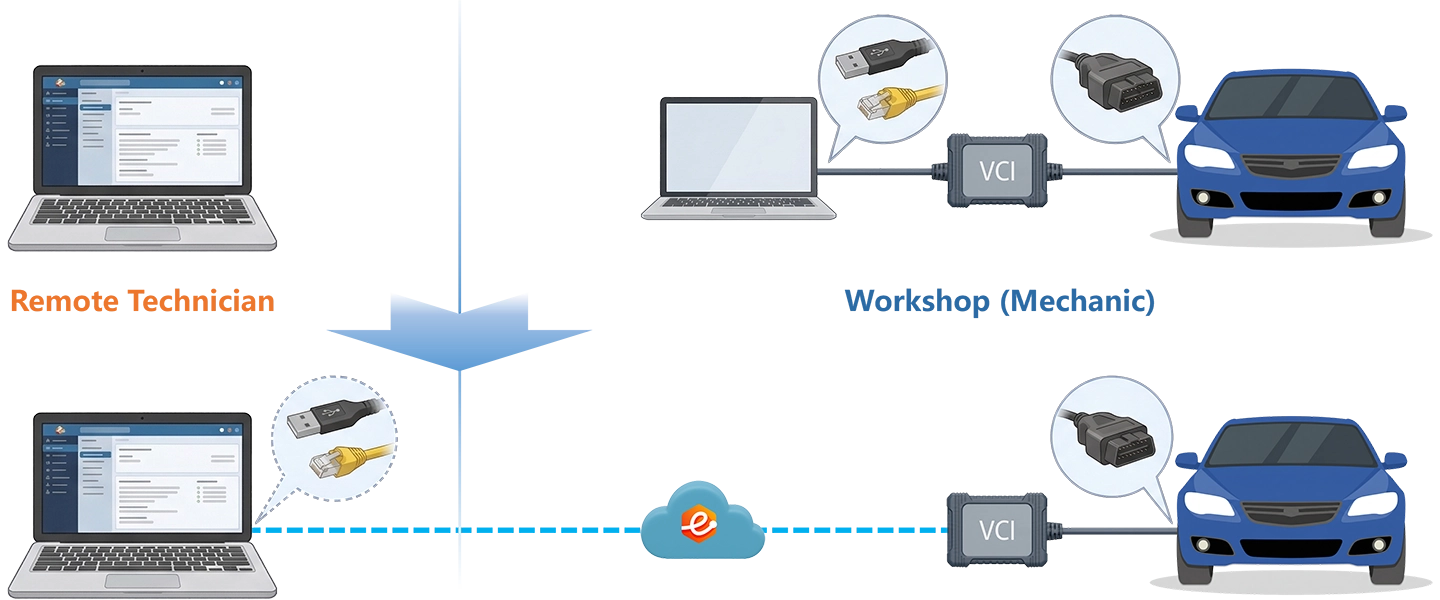
The workshop connects an ENET cable to the vehicle OBD port — a passive Ethernet adapter, not a multiplexer. eLinehub bridges that cable’s network interface at Layer 2 across the internet. XENTRY on your Technician PC discovers the vehicle as a locally connected DoIP target and operates it directly with your own Mercedes Online credentials.
- ✓ENET cable appears on the expected 172.29.x.x subnet — XENTRY discovers the vehicle as a locally attached DoIP target
- ✓SCN coding, ECU flash and SOC commissioning run on your PC with your own Mercedes Online credentials
- ✓The workshop only needs eLinehub Mechanic (free) and an ENET cable — no XENTRY install, no credentials, no subscription at the workshop
The workshop provides the vehicle and ENET cable. You bring XENTRY and your Mercedes Online credentials. eLinehub provides the bridge. · By eLinehub ·
ENET Cable or SD Connect? Start Here
The right approach depends on what VCI hardware the workshop has. Use this comparison to confirm you’re on the right page before booking a session.
The workshop’s vehicle is a 2019+ DoIP Mercedes and they have no SD Connect. Primary workflows: SCN coding, ECU flash, SOC commissioning via XENTRY.
The workshop owns SD Connect C4/C6, the vehicle is pre-DoIP (W204, W212, W222, W906 Sprinter), or you need DTS Monaco / Vediamo access. SD Connect guide →
If you work with workshops of both types, the same Technician PC handles both — ENET cable and SD Connect sessions both run through eLinehub on the same XENTRY installation, switched between orders.
Which Mercedes-Benz Vehicles an ENET Cable Covers
From approximately the 2019 model year onward, Mercedes-Benz shifted its primary diagnostic communication to DoIP (Diagnostics over Internet Protocol, ISO 13400). An ENET cable — a passive OBD-II to RJ45 adapter — gives XENTRY the Ethernet connection to the vehicle directly, without a multiplexer.
ENET cable does not work on pre-DoIP vehicles. W204, W212, W222, W166 GLE, pre-facelift W213 and W906 Sprinter communicate via CAN/K-Line — those platforms need SD Connect C4/C6.
Why DoIP Vehicles Still Require XENTRY and SCN Access
Switching to DoIP did not change Mercedes-Benz’s requirement for online SCN coding — it extended that requirement to every control unit on a more connected vehicle network. A W206, W223 or EQS carries the same post-replacement coding requirements as older platforms, plus SOC commissioning for EV-specific components. No aftermarket scanner can substitute for these steps.
The control units below represent the most common jobs where SCN coding, online programming or SOC commissioning is required on DoIP vehicles currently in active circulation.
ME Engine Control Unit
W206 C300/C43 · W223 S500/S580 · W167 GLE facelift · W214 E-Class
Flash and SCN coding are two separate steps on DoIP platforms. A completed flash without SCN leaves the ECU functional but uncoded — fault codes remain active, and follow-up SCN sessions on a partial-flash ECU carry additional risk.
9G-Tronic ETC — Transmission Control Unit
W213 facelift · W214 · W223 · GLE W167 facelift · GLS (EVA2 platforms)
The 9-speed automatic on EVA2 and newer platforms carries the same online SCN requirement as the 722.9 on older generations. Replacement units arrive unprogrammed and must be matched to the VIN.
ABS / ESP Control Unit
All DoIP platforms from W206 forward
Mandatory SCN coding for every replacement unit. No aftermarket scanner can substitute for the Mercedes Online authentication step.
MBUX Head Unit / NTG7 Infotainment
W206 · W223 · W214 · EQ series — NTG7 and later
Units sourced from breakers arrive uncoded. XENTRY must write the SCN number matched to the VIN and option configuration before audio, navigation and telephony functions become active.
SRS Airbag Control Unit (ACM)
All DoIP platforms
Post-collision shops that fit a replacement ACM and skip SCN cannot sign off the repair — the vehicle shows an active SRS fault and may fail a safety inspection.
Door Control Units (DCU)
W206 and W223 per Mercedes-Benz service bulletins
A replaced DCU reads as invisible in XENTRY quick test and produces a permanent chassis communication fault until SCN coded. Required per Mercedes-Benz service bulletins on current DoIP platforms.
For 2021-and-later vehicles — W206, W223, W167 facelift, W214, EQS, EQE — XENTRY additionally requires a Xentry diagnostic certificate (ZenZefi format) for offline guided diagnostics and adaptations behind the vehicle’s secure gateway. The certificate is held by you independently. eLinehub does not affect how XENTRY authenticates it. SCN coding runs through the live Mercedes Online session and is not blocked by the certificate requirement.
How eLinehub Works with ENET Cable
Screen sharing does not work for the same fundamental reason it does not work with SD Connect — XENTRY cannot discover a VCI through a screen relay. eLinehub bridges the ENET cable’s physical network adapter at Layer 2 across the internet. Your eLinehub Link virtual adapter receives the same Ethernet frames — DoIP responses, ECU broadcast traffic and topology scan data — that XENTRY expects from a locally attached ENET connection.
Layer 2 Network Adapter Bridge
eLinehub bridges the physical NIC connected to the ENET cable at driver level — not as a stream or screen relay. XENTRY receives actual DoIP broadcast frames and ECU topology responses exactly as it would on a local bench.
Minimal Mechanic-Side Setup
Significantly simpler than SD Connect C6. The Mechanic plugs the ENET cable into the vehicle OBD port and the workshop PC Ethernet port, opens eLinehub Mechanic, and shares the network adapter. No VCI management services to stop. No device-specific drivers to install.
IP Configuration — Same Subnet as a Local Bench
Once the bridge is active, configure the eLinehub Link adapter on your Technician PC with a static IP in the 172.29.x.x range (subnet mask 255.255.0.0, gateway 172.29.0.1). 172.29.127.119 is the standard starting point. Check for conflicts with the Mechanic’s physical NIC or any of your own NICs in the same range.
Connection mode: ENET cable uses network adapter bridging, which runs in Relay mode only. Select eLinehub Link in eLinehub Technician when connecting to an ENET cable workshop.
Current limitation: DTS Monaco and Vediamo compatibility via ENET cable has not been validated. If you need DTS Monaco or Vediamo access, the workshop requires SD Connect C4/C6 — see the SD Connect guide.
Mercedes-Benz DoIP Remote Diagnostics: Three Live Scenarios
Each scenario starts from the point where the mechanical work is done and the ENET cable is the only VCI hardware at the workshop. IP configuration in Scenarios B and C refers back to Scenario A, Step 4.
TCM / DCU / MBUX Replacement with SCN Coding on W206 or W223
Applicable to any current DoIP-platform vehicle requiring standard module replacement coding — W206, W223, W214, GLE W167 facelift, EQ series.
- Mechanic connects ENET cable to the vehicle OBD port and to the workshop PC via RJ45 Ethernet port. Verifies Windows shows an active network link on that NIC. Opens eLinehub Mechanic, creates a new order and shares the Passcode.
- You enter the Passcode in eLinehub Technician to accept the order. Select Mechanic Network Adapter and choose eLinehub Link as the bridging mode.
- Wait for the eLinehub adapter to show connected status. Do not launch XENTRY until the adapter is active.
- Open Windows Network Connections on your Technician PC. Locate the eLinehub Link adapter. Set IPv4: address in the 172.29.x.x range, subnet mask 255.255.0.0, gateway 172.29.0.1. Use 172.29.127.119 unless it conflicts with the Mechanic’s NIC IP or a physical NIC on your PC already in the 172.29.x.x range.
- Launch XENTRY Diagnosis. XENTRY sends a DoIP broadcast and discovers the vehicle. Vehicle identification completes at normal speed.
- Quick test identifies the replacement module as present but uncoded. Navigate to the relevant control unit → control unit variant coding. Authenticate with your Mercedes Online credentials directly in XENTRY. SCN request returns the calibration number and writes it to the unit.
- Quick test confirms the unit is coded and visible. Residual faults cleared. Job complete.
On a stable connection with normal SCN server response, this remote session typically runs 15–25 minutes from connection to fault-clear.
SOC Commissioning After High-Voltage Component Replacement on EQS or EQE
Specific to EV platforms with Secure Onboard Communication protection — EQA, EQB, EQC, EQE, EQS and AMG EQ variants. Example: N83/1 DC/DC converter (DDW) replacement on W297-platform EQS.
- Mechanic confirms all high-voltage safety prerequisites are met: HV system deactivated, isolated and locked out per Mercedes-Benz service procedures. ENET cable connected to vehicle OBD port and workshop PC.
- Mechanic creates order and shares Passcode. You accept and connect through eLinehub Link. Configure the adapter IP per Scenario A, Step 4.
- Launch XENTRY. DoIP discovery completes. Quick test identifies the replacement component and flags SOC commissioning as required.
- XENTRY opens the SOC commissioning guided procedure. Read through each safety acknowledgment step and confirm with the on-site Mechanic that the physical state of the vehicle matches each XENTRY requirement before proceeding.
- XENTRY contacts the Mercedes-Benz backend for the SOC registration sequence. The commissioning process completes — the replacement component is now authorized on the vehicle network.
- Charging system functionality verified via XENTRY actuator tests. Quick test confirms no active faults.
You must hold high-voltage safety certification appropriate to your jurisdiction before managing any SOC commissioning session. The Mechanic handles all physical safety steps on-site; you manage only the software side.
Post-Collision ADAS Initialization on W213 Facelift or W214 E-Class
Active after bumper repair, radar sensor replacement or windshield replacement on DoIP E-Class variants — W213 facelift (2020+) and W214.
- Confirm body repair is complete. Verify all radar sensors and cameras are reinstalled in original mounting positions before any software work — initialization will not compensate for a physically misaligned sensor.
- ENET cable connected to vehicle OBD port and workshop PC via RJ45. Mechanic creates order and shares Passcode.
- You accept, connect through eLinehub Link and configure the adapter IP per Scenario A, Step 4.
- XENTRY discovers the W213 or W214 over DoIP. Quick test identifies BSM and ESP fault codes related to SRR sensor communication.
- Navigate to SRR module → adaptations → radar sensor initialization. The rear SRR teach-in on W213 facelift is dynamic — no physical calibration target required. The procedure runs entirely through XENTRY after confirming sensor mounting position is correct.
- For windshield replacements: navigate to camera module → static calibration. The workshop floor must have the correct calibration target at the OEM-specified distance before starting this step.
- Clear all ADAS fault codes. Road test above 30 km/h to confirm Blind Spot Assist mirror indicator activation.
For windshield replacements: forward cameras on W213 facelift and W214 require a static calibration target at the OEM-specified distance. Confirm the workshop floor is prepared before scheduling the XENTRY session.
Ready to run your first remote XENTRY session?
The workshop installs eLinehub Mechanic and plugs in an ENET cable. You bring XENTRY and your Mercedes Online credentials.
Download Technician Software — Free TrialEnd-to-End Setup
System requirements: Windows 7 64-bit minimum; Windows 10 or 11 64-bit recommended. Not supported on Mac, Linux, Android or Windows ARM.
Both sides need a stable wired internet connection. See Section 7 for latency and bandwidth requirements.
- Connect ENET cable to the vehicle OBD port and to the workshop PC via RJ45 Ethernet port. Verify Windows shows an active network link on that NIC.
- Install eLinehub Mechanic on the workshop Windows PC.
- Open eLinehub Mechanic, create a new order and share the Passcode. No XENTRY, Mercedes Online credentials or VCI management software required. The Mechanic software is free.
- Install eLinehub Technician on the PC where XENTRY and your Mercedes Online credentials are already configured.
- Sign in and accept the order by entering the Passcode shared by the Mechanic. If the workshop uses a Custom Mechanic build, orders are auto-assigned.
- Select Mechanic Network Adapter and choose eLinehub Link as the bridging mode.
- Once the bridge is established, open Windows Network Connections and locate the eLinehub Link adapter. Set IPv4: 172.29.127.119 (or another address in the 172.29.x.x range), subnet mask 255.255.0.0, gateway 172.29.0.1. Check for conflicts with the Mechanic’s NIC IP or any physical NIC on your PC in the same range.
- Launch XENTRY Diagnosis. The vehicle appears as a locally connected DoIP target.
Network Requirements
Both sides need a minimum 10 Mbps upload bandwidth. Wired connections are required on both sides for SCN coding and flash sessions. Check live latency in the eLinehub connection panel before starting any SCN coding or programming session.
Before any SCN coding or online flash: connect a professional programming power supply delivering steady 13.5–14.2 V at 100 A+ to the vehicle. Voltage drop during a flash is the most common cause of a partial write and a damaged ECU.
DoIP internet continuity: when the ENET cable is bridged and the vehicle’s DoIP network has an active gateway, your internet connection may drop while the diagnostic session stays active. Use the Switch button in eLinehub to toggle between diagnostic priority mode and normal internet mode — only between sessions, never during SCN coding or active programming.
Mercedes-Benz DoIP Platform Compatibility
eLinehub also supports VW Group (VAS6154A, ODIS), BMW (ENET cable, ICOM), JLR (DoIP VCI, Pathfinder/SDD) and GM (MDI2, GDS2, SPS2) — all from the same Technician PC.
Customer Protection
eLinehub is built so that the Technician’s workshop relationships stay with the Technician — not with the platform.
Passcode Order Protection
Every order requires a Passcode to accept. No other specialist on the platform can pick up a workshop’s job without it. The Mechanic shares the Passcode directly with the Technician they already work with — the relationship stays private.
Custom Mechanic Software
Distribute a white-label Mechanic build permanently linked to your Technician account. Orders from that workshop are auto-assigned to you by default, with no Passcode exchange needed for routine sessions. No other specialist can claim the workshop through a white-label install.
Secure Order Sharing
For complex multi-ECU jobs or SOC commissioning on EV platforms, you can share a specific order with a trusted colleague. The colleague sees the VCI data for that order only — not the Mechanic’s contact details, not any other orders.
Mercedes-Benz DoIP Remote Diagnostics FAQ
Start Your First Remote XENTRY Session
Free trial starts automatically. No credit card required to get started.
Questions or setup support: support@elinehub.com