
Remote VCI Access for Tool Dealers,
Parts Suppliers and Training Providers
Add ECU Programming to Your Business Without Building Infrastructure
A J2534 tool that ships back clean. A replacement TCM that stalls because the shop has no ISTA-P. A programming course capped at twelve students because that is how many bays your training facility has. The constraint in each case is not expertise. It is physical access to hardware that sits at the customer or student site.
- ✓J2534 and DoIP support cases your engineer closes with direct device access — the tool stays at the customer’s bench, the RMA never ships
- ✓Replacement modules that leave your warehouse with programming finalization included — variant coding and adaptation resets completed under your OEM accounts, the return reason eliminated before it forms
- ✓Training labs where every student works on a real VCI connected to a real vehicle at their own location — class size is a scheduling decision, not a facility constraint
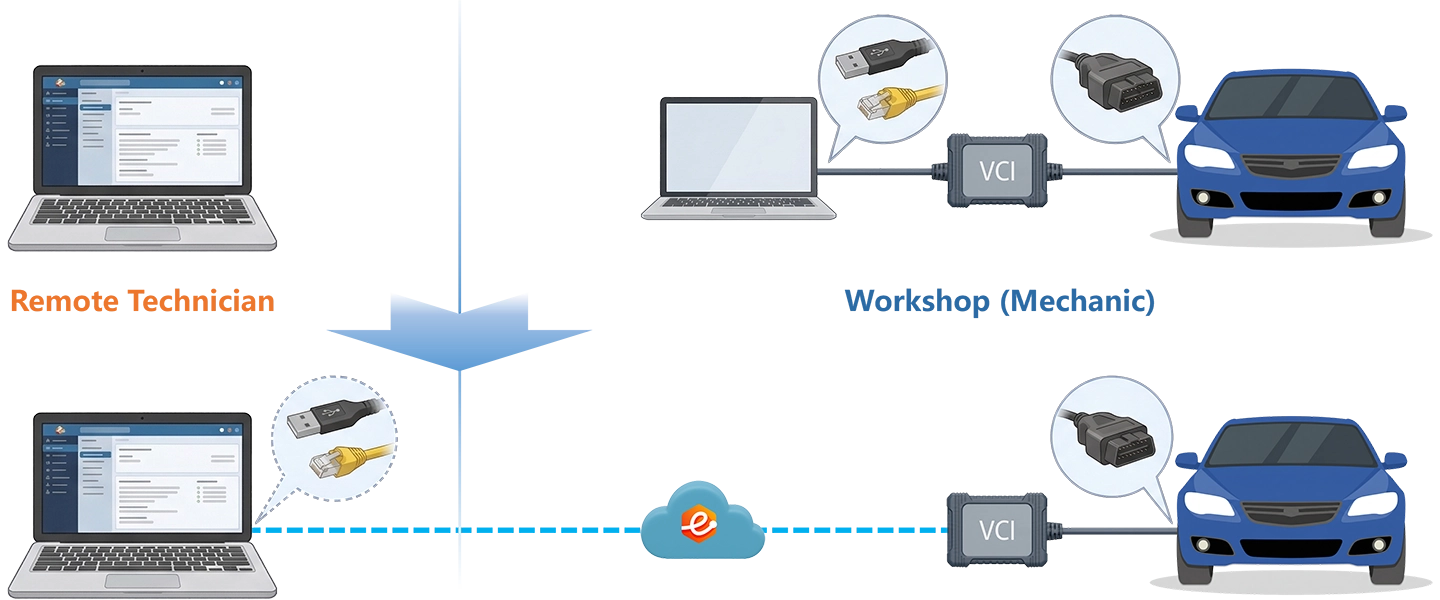
Your expert’s PC sees the customer’s physical VCI as a locally connected device — same USB device ID, same Ethernet adapter behavior, same protocol responses as a bench session. Your OEM software does not know the interface is remote.
You bring OEM software and accounts. The workshop connects the VCI. eLinehub provides the bridge. · By eLinehub ·
Reduce NFF returns. Resolve J2534 and DoIP issues without the tool leaving the shop.
Bundle remote ECU programming finalization with every module order.
Run live remote J2534 and OEM programming labs with real hardware and full instructor control.
How eLinehub Works — One Paragraph
eLinehub installs a lightweight Mechanic client at the customer site and a Technician client on your expert’s PC. The customer connects their VCI to the vehicle and runs eLinehub Mechanic. Your expert accepts the session in eLinehub Technician: the VCI appears as a locally attached device — same USB device ID for J2534 interfaces, same Ethernet adapter behavior for DoIP interfaces. Your OEM software enumerates it exactly as it does on a local bench. No screen share. No hardware proxy. The customer’s tool never leaves the shop.
- •Both the Mechanic PC and the Technician PC must run Windows 7 64-bit or later (Windows 10/11 recommended for all OEM programming workflows)
- •Windows ARM, Mac, Linux and Android are not supported
- •The Mechanic and Technician clients can be installed on the same PC but cannot run simultaneously
- •Minimum upload bandwidth: 10 Mbps on both sides
Reduce NFF Returns — Resolve J2534 Issues Remotely
The most expensive support call you handle is the one that ends in an RMA that comes back clean. A shop returns a VAS6154A or CarDAQ-Plus 3 claiming it “doesn’t work with ODIS.” Your bench team receives it, installs the driver, runs PassThru validation, everything passes. NFF. Return shipment cost, technician time, customer frustration — and the underlying problem is still unresolved at the shop.
In the majority of NFF cases for J2534 devices, the fault is not the hardware. The four causes your bench team cannot see over a screen share:
Wrong Driver Version
The driver is installed — but not the build that matches the Windows version running at the shop. The adapter enumerates, PassThru opens, then fails on the first ISO 15765 channel. Your bench never replicates it because your bench runs a different Windows build. The shop waits for a replacement that will behave identically.
Incorrect PassThru Filter Configuration
The filter is set to the wrong CAN bus ID for the vehicle being tested. Frames are transmitted but no response is received. The shop reads this as a hardware fault. The adapter is working correctly — the filter is not. This is only visible when your engineer opens a J2534 channel against the physical device and inspects the filter set directly.
DoIP Discovery Blocked at the Subnet
The shop router is blocking UDP broadcast on the local subnet. The DoIP VCI announces itself but the diagnostic software never receives the response. Presents as “device not found” — indistinguishable from a hardware failure without access to the network layer at the customer site.
COM Port Held by a Background Process
The adapter initialization sequence times out because a co-installed VCI management tool is holding the COM port. The adapter is fully functional. The conflict is only visible in the device manager state at the customer PC — not in any screenshot they can send you.
None of these are visible in a screenshot. None of them can be diagnosed over a screen share. They are only visible when your engineer has direct access to the device.
What eLinehub Changes for Tool Support
eLinehub maps the customer’s VCI to your support engineer’s PC as a local J2534 or DoIP device. Your engineer opens their own copy of DrewLinQ, the OEM’s PassThru validation tool, or any J2534 API test harness — and talks directly to the physical adapter sitting at the customer’s bench.
The diagnostic logic is straightforward. Your Technician PC runs a known-clean software environment — correct driver version, no conflicting VCI management tools, no background processes holding COM ports. When the customer’s VCI is mapped to your engineer’s PC, your engineer runs the same PassThru validation sequence they would run on a bench.
Two outcomes, both definitive:
The VCI hardware is not the problem. The fault is in the customer’s environment — driver version, filter configuration, subnet routing, or a software conflict. Your engineer can now walk the customer through the specific fix with the device live in their hands, watching actual device responses rather than interpreting screenshots. The RMA is cancelled. The session closes in under an hour.
You have a complete J2534 API sequence log showing exactly where and how it failed, captured against a clean environment. That log is the engineering escalation data. The RMA proceeds with evidence, not assumption.
Either way, the question that previously required shipping hardware back and forth is answered in a single remote session.
Run PassThruOpen, enumerate channels, set filters, send and receive ISO 15765 or CAN frames directly against the customer’s adapter. Confirm filter configuration, baud rate, CAN ID masking and protocol flags — not through a screenshot, but through the actual device response.
Verify driver version, firmware build, USB enumeration state and device descriptor. Identify conflicts with co-installed VCI management software. Reproduce the initialization failure on your end and walk the customer through the fix with the device live in your hands.
For Ethernet-based VCIs (SD Connect C6, JLR DoIP VCI, MDI2), map the adapter using eLinehub Link — the default bridge mode for DoIP interfaces — and verify DoIP discovery behavior: UDP broadcast response, IP assignment, entity announcement and session setup timing. If the diagnostic software requires binding to a specific local network adapter, use eLinehub vNet instead. Identify routing issues, subnet mismatches and gateway configuration problems that are otherwise invisible.
Run a complete J2534 API sequence log before approving an RMA. If the adapter passes, the log is the evidence. If it fails, the log is the engineering escalation data. Either way, you stop shipping hardware back and forth to answer questions that can be answered in a 20-minute remote session.
When a Tier-1 case needs engineering involvement, your Tier-1 engineer can invite a Tier-2 specialist into the active session. External collaborators see the shared VCI and the session data — they do not see the customer’s name, contact details or location. Your customer relationship stays intact.
For tool providers with an established customer base, eLinehub can provide a Custom Mechanic build branded with your company name and logo. Customers install your support client — not a generic eLinehub installer. Sessions created through your branded client auto-assign to your support team without any Passcode exchange. From the customer’s perspective: they opened your app, connected their tool, and your engineer appeared. The eLinehub platform is infrastructure they never see.
Bundle Remote ECU Programming With Every Order
A shop orders a replacement TCM for a BMW F30. The part arrives, the mechanical swap is straightforward. Then the job stalls. The module goes back marked “wrong part” or “doesn’t work.” Your returns team receives a fully functional part. The missing element is never the part — it is the programming step that requires OEM software and online credentials the shop does not have.
The five most common scenarios where the programming step becomes the return reason:
BMW — TCM / EGS replacement (ZF 8HP, GA8HP)
ISTA-P must write the vehicle order (FA/FP) to the new unit, match ISN coding to the CAS/EGS, and reset gearbox adaptations. Without a BMW Online account and ISTA-P, the swap is mechanically complete and electrically non-functional. The vehicle cannot leave the workshop.
Mercedes-Benz — BCM / EIS / KOMBI replacement
SCN coding via XENTRY requires an active FDOK account. The new unit carries no vehicle-specific data from the factory. Without coding, the module does not communicate with the rest of the network. Immobiliser remains active, instrument cluster non-functional, or comfort systems inoperative — all presenting as “wrong part.”
VW Group — any control unit with Component Protection
SFD unlock and Component Protection release require ODIS-Engineering with VW Online credentials. Without this step, the replacement unit enters a locked state regardless of whether the hardware is correct. The part is fully functional until installed — then immediately non-functional. Every return in this category is an NFF return.
GM — TCM / ECM replacement
SPS2 via Techline Connect queries GM’s servers for the calibration file matched to that VIN and RPO configuration, then writes it in a single connected session. A shop without an ACDelco TDS subscription cannot complete this step. The replacement TCM arrives without calibration data; the vehicle shifts in limp mode or throws a P0700.
Ford — PCM replacement (post-2018 FDRS vehicles)
FDRS Programmable Module Installation (PMI) is required regardless of whether the replacement module is new or remanufactured. On SYNC 4 platforms, additional TRON authentication routines must follow PMI in the correct sequence. Without Ford PTS credentials, this sequence cannot be initiated. The replacement PCM is installed but the vehicle will not start normally.
In every case, the missing element is not the part. It is the programming step that requires OEM software and online credentials the shop does not have.
This creates a decision point for every parts supplier: ignore the programming gap, or solve it. The gap does not disappear because you don’t address it.
The shop installs the module and hits the wall. They cannot tell whether the part is defective or simply unprogrammed — the symptoms are identical. They mark it “doesn’t work” and return it. Your returns team receives a fully functional module. You absorb the return cost, the shipping, and the restocking. For high-value modules — a BMW EGS, a Mercedes EIS, a VW unit with Component Protection — this ambiguity is expensive. The shop’s confidence in ordering from you again is lower than it should be, for a problem that was never a parts problem.
Your programming specialist shares their screen with the shop and attempts to walk them through the coding sequence. The shop needs ISTA, XENTRY or ODIS installed locally — software they almost certainly don’t have, which is why they ordered from you in the first place. If they do have it, your specialist’s OEM account credentials must be entered on the shop’s machine and are now visible to a third party. Remote desktop also cannot bridge the VCI connection: the shop’s VCI is physically attached to their PC, and any step that requires the diagnostic software to enumerate the VCI runs under the shop’s environment, with all the configuration problems that caused the original return.
The shop finds a local J2534 programmer, schedules an appointment, and waits. Your part sits on their bench. The job is on hold. When the technician arrives, they may or may not have the correct OEM software and active subscription for that specific platform. You have no visibility into whether the job gets completed, no control over the outcome, and no credit for the resolution. The shop remembers that buying your part created a complicated situation — not that you sold them a correct part.
Remote ECU Programming Finalization as a Product Line
eLinehub makes it possible to deliver remote programming finalization as a standard, repeatable part of every module order — not as an ad-hoc favor, but as a packaged service your team executes systematically.
- Shop receives the replacement module and installs it.
- Shop connects their VCI to the vehicle and opens your branded eLinehub Mechanic client.
- Your remote programming specialist accepts the session, maps the VCI, and launches the appropriate OEM software on their own PC — ISTA-P for BMW, XENTRY for Mercedes, ODIS-Engineering for VW Group, GDS2/SPS2 for GM, FDRS for Ford.
- Coding, adaptation and calibration are completed under your specialist’s OEM accounts.
- Vehicle is driveable. No return. No dealer trip.
- A Windows PC per specialist with the relevant OEM software installed and accounts configured
- eLinehub Technician — one account per specialist
- A Custom Mechanic build to distribute to partner shops (optional but recommended for volume)
- Their existing VCI connected via USB or wired Ethernet
- eLinehub Mechanic installed — free, no OEM software required
The simplest implementation: add a line item to the product listing.
Shops selecting this option receive a link to your Custom Mechanic installer alongside the shipment confirmation. When the part arrives and is installed, they open the app and the session is waiting.
Live Remote J2534 and OEM Programming Labs With Real Hardware
Automotive programming training has one structural problem: the skills that matter — ECU flash sequencing, J2534 filter configuration, DoIP session establishment, SFD and SCN coding — can only be learned on real hardware running real OEM protocols against real vehicles.
The three alternatives that do not close this gap:
Recorded Screen-share Walkthroughs
Students watch an instructor complete a programming sequence on a recording. The skills that matter — reading device state, recovering a timed-out session, interpreting a PassThru error code in real time — require a live device responding to live commands. A recording shows the outcome. It does not develop the judgment that comes from an unexpected response.
Simulation Environments
Simulators model expected protocol behaviour. OEM programming workflows are defined by unexpected behaviour: what happens when a DoIP session drops mid-flash, what a SFD rejection code means in context, how ISTA-P responds when ISN coding fails the first attempt. These are not modelable in a simulator. They happen on real hardware.
Physical Colocation
Until recently the only viable approach. Class size is limited by available bays and VCIs. Geographic reach is limited to students who can attend in person. A three-day BMW and VW programming bootcamp serving students from different countries requires either a very large facility or a very small class.
Live Remote VCI Labs With eLinehub
eLinehub changes the hardware constraint. A training session that previously required every student to be physically present at the same vehicle now runs across locations — each student at their own PC, all of them working on the same training vehicle or their own local hardware, under the same instructor.
A complete remote training session runs in three stages.
The instructor connects to the training vehicle via eLinehub Technician — the training facility’s vehicle runs eLinehub Mechanic. Students watch the instructor’s screen via a standard screen share tool (Zoom, Teams, or equivalent) while the instructor narrates the session in real time: filter setup, channel initialization, programming sequence, what a DoIP session establishment looks like when it works, and how to recover when it doesn’t. Students see exactly what the instructor sees — live device responses, real protocol timing, actual OEM software behavior against a real vehicle. Not a recording. Not a simulation.
The instructor adds all enrolled students to their eLinehub team. The training vehicle’s Mechanic session remains active throughout the class. The instructor assigns students to operate in sequence: one student’s Technician account connects to the Mechanic, executes the same procedure the instructor just demonstrated, while the instructor monitors and can re-map the VCI at any point to demonstrate a correction. One Technician connected to the Mechanic at a time — the team structure ensures no student can join out of sequence or interrupt another’s session. Each student completes the same procedure on the same vehicle, in the same software environment the instructor used.
When a student encounters a problem on their own vehicle after the class, they connect their local VCI to their own vehicle and create a Mechanic session. The instructor accepts it in eLinehub Technician — now the instructor’s PC sees the student’s actual VCI as a locally connected device. The instructor runs the same diagnostic sequence against the student’s real hardware and can demonstrate the correction in real time, on the student’s actual vehicle. This is not screen sharing. A problem that would take three email exchanges and two days to diagnose over text is resolved in fifteen minutes.
Specific Training Scenarios
Students connect BMW ENET cables to F- or G-series training vehicles. Instructor maps the ENET adapter using eLinehub Link and demonstrates ISTA vehicle identification, SWE list reading and programming sequence on the training vehicle before handing the session back for supervised practice. For sequential practice sessions, the instructor assigns each student in turn via the team queue — each student connects their own Technician account to the same training vehicle and completes the ISTA identification and SWE read sequence independently before the instructor passes to the next.
Students connect VAS6154A adapters to MQB or MLB platform vehicles. Instructor maps the VAS6154A via USB device mapping and demonstrates SFD coding procedure with VW Online credentials — a workflow that would otherwise require students to each hold a VW Online subscription and ODIS-Engineering license.
For engineers learning to build J2534 applications: students install a J2534 device locally, instructor maps it remotely and demonstrates PassThruOpen, filter configuration, frame construction and protocol timing using a J2534 test harness. Participants do not need a vehicle — any J2534-compatible adapter connected to the training PC is sufficient.
A three-day course covering BMW, Mercedes and VW programming. One set of training vehicles and VCIs, one instructor. Students join from different locations, each with access to their own regional training facility’s hardware. The instructor runs the sessions remotely.
Training providers distributing eLinehub to students can use a Custom Mechanic build branded with the training organization’s name. Students install the branded client as part of the course prerequisite setup. Sessions created through it auto-assign to the instructor’s account. No Passcode management per session — students open the app, connect their VCI, create an order, and the instructor’s queue is updated.
Your Customer Relationships Stay Yours
Every customer relationship you build through this platform represents recurring revenue that depends on the relationship staying yours. The structural risk of any shared remote platform is that it becomes the relationship instead of you. eLinehub’s session control is built to prevent this at the account level.
Passcode Order Protection
Every session creates a unique Passcode set by your Technician. Only the specialist who holds the correct Passcode can accept that session — no other user on the platform can access the hardware or intercept the order. A shop that opens a support ticket with your team gets your engineer, not whichever specialist happens to be available on the platform.
Relationship Stays with Your Brand
With a Custom Mechanic build, every session auto-assigns to your support team by default — no Passcode exchange required, no possibility of the session routing elsewhere. From the customer’s perspective: they opened your app, connected their tool, and your engineer appeared. The relationship is with your brand, not a platform they could browse for alternatives.
Escalation Without Identity Exposure
When your Technician invites a colleague or external expert into an active session, that collaborator sees the shared VCI and the session data. They do not see the customer’s name, contact details, company or location. The workshop relationship is not exposed. The collaborator resolves the technical problem and leaves. The customer relationship remains yours.
Evaluate Without Commitment
eLinehub Technician is free to download and includes a working trial with enough Credits to run complete test sessions across all three use cases.
- Download eLinehub Technician on your support engineer’s PC.
- Have a colleague install eLinehub Mechanic on a second PC and connect any J2534 device.
- Run a remote PassThru validation session — open a J2534 channel, configure filters, confirm frame exchange.
- Evaluate whether your support team can replicate their existing bench diagnostic process remotely.
- Download eLinehub Technician on your programming specialist’s PC (with XENTRY, ODIS, ISTA or relevant OEM software already installed).
- Have a workshop contact install eLinehub Mechanic and connect their VCI to a test vehicle.
- Run a full coding or adaptation session — treat it as a real job.
- Evaluate whether the session quality is sufficient for production use.
- Download eLinehub Technician on the instructor PC.
- Have a student or colleague install eLinehub Mechanic and connect a VCI at a separate location.
- Run a demonstration session using your standard curriculum content.
- Evaluate latency, VCI behavior and session control against your live lab requirements.
Need more trial Credits or a longer evaluation window? Contact us at support@elinehub.com — describe your use case and we will extend your trial accordingly. No sales process, no commitment required.
Connection Quality — Two Tiers
Session performance depends on connection quality at both ends. Requirements differ by session type.
- Upload: 10 Mbps minimum (wired or stable Wi-Fi acceptable)
- RTT: under 150 ms
- Packet loss: under 1%
J2534 support sessions, DoIP validation, diagnostic data review, training demonstration mode.
Device enumeration, filter validation and live data exchange behave normally. Occasional latency spikes affect interaction speed, not session integrity.
- Upload: 10 Mbps minimum — wired connection required on both sides
- RTT: under 80 ms
- Packet loss: under 0.5%
All ECU flash operations: ISTA-P, FDRS PMI, SPS2 calibration writes, XENTRY SCN coding, ODIS Component Protection release.
A dropped connection during the active flash window carries the risk of an incomplete write. Do not initiate a flash session over Wi-Fi at either end.
Connection mode for programming sessions: eLinehub operates in Relay mode for all ECU flash and module programming workflows. Direct (P2P) mode is available for USB device sessions only — it is not compatible with network adapter mapping (eLinehub Link / eLinehub vNet). For all DoIP and RNDIS-based programming workflows, Relay mode is the required and default setting. Select the Relay server with the lowest measured RTT before initiating a flash session.
Common Questions — Tool, Parts & Training
Seven questions covering infrastructure requirements, NFF resolution, module programming bundling, live training labs, Custom Mechanic branding, customer site requirements and supported VCI hardware.
Start Your First Remote VCI Session
Your OEM software, accounts and credentials stay exactly where they are. Your customer or student connects a VCI. eLinehub provides the bridge. Free trial starts automatically.
Questions about Custom Mechanic builds or extended trials: support@elinehub.com