
Remote Jeep wiTECH Programming
— MicroPod II and MDP
Replacing a BCM, flashing a PCM after a TSB, or running Proxi Configuration Alignment after an ECM swap — none of these jobs closes without wiTECH 2.0. eLinehub maps the MicroPod II or Mopar Diagnostic Pod at the workshop to your Windows PC over the internet. wiTECH 2.0 detects the interface the same way it would if the VCI were sitting on your desk, with no changes to your wiTECH account or TechAuthority subscription.
- ✓MicroPod II and MDP appear on your Technician PC as locally connected USB devices — wiTECH 2.0, Proxi Alignment, and ADAS calibration run from your own authenticated session
- ✓BCM replacement, PCM flash, Proxi Alignment, NASTF key programming, and collision-repair ADAS calibration all run on your PC with your own wiTECH and TechAuthority credentials
- ✓The workshop needs only eLinehub Mechanic (free) and the VCI hardware — no wiTECH subscription, no TechAuthority account at the workshop
The workshop connects the MicroPod II or MDP and the vehicle. You bring wiTECH 2.0 and TechAuthority credentials. eLinehub provides the bridge. · By eLinehub ·
You hold a wiTECH 2.0 subscription and TechAuthority access and want to perform remote BCM replacement, PCM flashes, Proxi Alignment, and ADAS calibration for workshops that have a MicroPod II or MDP but no wiTECH credentials.
You supply MicroPod II or MDP hardware, Stellantis OEM replacement modules, or wiTECH training and want to include remote programming as part of the sale — without requiring a full wiTECH and TechAuthority setup at every customer location.
You run multiple Jeep service locations or manage a fleet with Grand Cherokee WL, Compass, Wrangler, or Cherokee vehicles and need centralized remote ECU programming without stationing a wiTECH-qualified specialist at each site.
MicroPod II or MDP? Which VCI Does Your Jeep Require
Both VCIs connect to the workshop PC via USB and use the same eLinehub USB mapping mode. The difference is protocol support: MicroPod II handles CAN-based vehicles, while MDP is required for Atlantis High architecture (CAN FD and Ethernet) introduced with the 2021 Grand Cherokee WL. Shops servicing both generations need an MDP — it supports all vehicles the MicroPod II supports, plus the new platforms.
CAN Vehicles — ~2006 to 2020MY
| Protocol | CAN, K-Line |
| Connects to PC | USB |
| wiTECH local IP | 172.22.22.22 |
| eLinehub mode | Mechanic USB |
| P2P / Direct | Available (both wired, RTT < 80 ms) |
Use for: KL Cherokee, WK2 Grand Cherokee, MP Compass, JL Wrangler, JT Gladiator, BU Renegade.
Atlantis High + All CAN Vehicles
| Protocol | CAN FD, Ethernet, CAN |
| Connects to PC | USB |
| wiTECH local IP | Same USB mapping behavior |
| eLinehub mode | Mechanic USB |
| P2P / Direct | Available (both wired, RTT < 80 ms) |
Required for: Grand Cherokee WL 2021+, Wagoneer/Grand Wagoneer 2022+. Also supports all MicroPod II-compatible vehicles.
The workshop services KL Cherokee, WK2 Grand Cherokee, MP Compass, JL Wrangler, JT Gladiator, or BU Renegade — all CAN-based platforms. MicroPod II handles every wiTECH function on these vehicles, including BCM replacement, PCM flash, and Proxi Configuration Alignment.
The workshop services 2021+ Grand Cherokee WL or 2022+ Wagoneer/Grand Wagoneer, or any future Stellantis Atlantis High vehicle. MDP is also the right single device for mixed-generation shops — it covers every vehicle the MicroPod II covers, plus the new platforms.
Why Jeep Repairs Require wiTECH — Not Just a Scan Tool
On current Jeep platforms, replacing a module is only half the job. The vehicle will not shift, keys will not start it, or warning lights will not clear — regardless of how clean the mechanical work was — until wiTECH 2.0 completes the VIN-specific programming sequence with TechAuthority. No aftermarket scan tool replicates these steps.
The six job types below represent the most common cases where an authenticated wiTECH session is the only path to completion.
PCM, BCM, and ECM Replacement After Part Failure
WK2/WL Grand Cherokee · KL Cherokee · MP Compass · JL Wrangler · BU Renegade · JT Gladiator
Unlike aftermarket scanners, wiTECH 2.0 performs the full VIN-specific module write sequence — programming the blank replacement module to the VIN, loading calibration data from TechAuthority, and completing Restore Vehicle Configuration. Every blank replacement PCM, BCM, or ECM requires this sequence before the vehicle operates correctly.
Proxi Configuration Alignment
KL Cherokee · WK2/WL Grand Cherokee · MP Compass · BU Renegade · JT Gladiator
Unlike a simple module adaptation reset, Proxi Alignment is a full database reconciliation — each module’s stored list of which other modules exist on the vehicle must be updated after any control module swap. It runs through wiTECH’s Vehicle Preparations menu and is mandatory. Skipping it leaves the newly installed module unable to communicate with the rest of the network.
Atlantis High Architecture — MDP Required
MDP OnlyGrand Cherokee WL 2021+ · Wagoneer / Grand Wagoneer 2022+
Unlike any previous Stellantis architecture, Atlantis High replaced CAN bus with CAN FD and Ethernet across the WL platform. MicroPod II cannot communicate with this architecture — it produces incomplete topology maps and failed module reads on every 2021+ Grand Cherokee WL. The Mopar Diagnostic Pod (MDP) is required for all diagnostics and programming on Atlantis High vehicles.
TSB-Driven Reflashes — Compass MP and Cherokee KL
Compass MP 2017–2024 · Cherokee KL 2014–2023
Unlike aftermarket scan tools, wiTECH 2.0 accesses TechAuthority-hosted flash files tied to the specific VIN. TSB-related PCM, BCM, and BSCM software updates on Compass and Cherokee — including brake system, powertrain, and Driver Assistance System Module updates — are wiTECH-only procedures. No aftermarket tool can download or execute these calibrations without a TechAuthority Reprogramming Subscription.
How eLinehub Maps the MicroPod II and MDP to Your wiTECH Session
Both the MicroPod II and MDP present to the workshop PC as USB devices — specifically as USB Ethernet Gadgets that expose a local network adapter. eLinehub maps this USB device across the internet to the Technician’s PC, where the same local network interface materializes. wiTECH 2.0 on the Technician’s machine then discovers the MicroPod II or MDP at 172.22.22.22 and operates it exactly as it would in a direct local session. No changes to wiTECH 2.0 configuration or account settings are required.
Both the Mechanic’s PC and the Technician’s PC require the wiTECH Driver x64 installed. The Mechanic’s machine needs it to recognize the physical hardware; the Technician’s machine needs it to handle the mapped USB device and create the local network interface. No diagnostic software, wiTECH subscription, or TechAuthority account is required on the Mechanic’s PC.
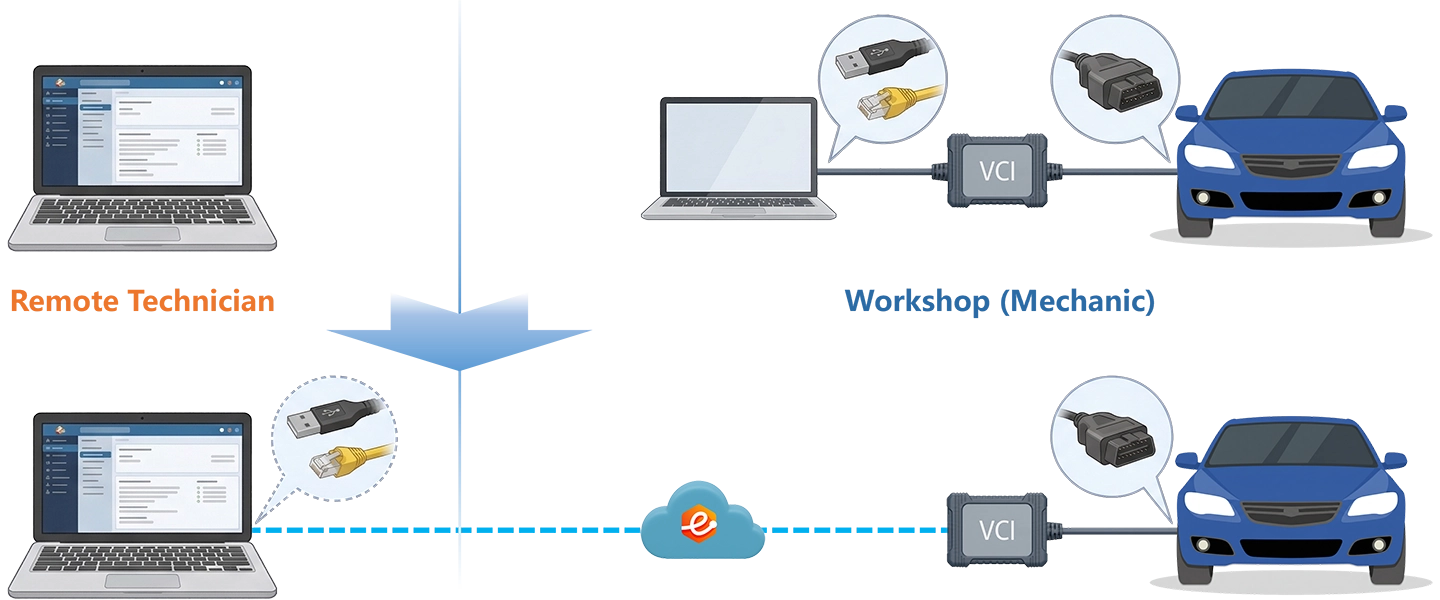
Comparing Remote Access Methods for wiTECH Sessions
Four Jeep Remote Programming Scenarios, Step by Step
Each scenario starts from the point where the mechanical work is done and the VCI is connected to the workshop PC via USB.
Grand Cherokee WL BCM Replacement + Proxi Configuration Alignment
Remote programming specialist; collision repair shop requiring a VIN-coded replacement BCM and post-swap Proxi Alignment before vehicle delivery.
- Connect MDP to the vehicle OBD-II port and to the workshop PC via USB. The 2021+ Grand Cherokee WL requires MDP — MicroPod II will not complete BCM programming on Atlantis High vehicles.
- Open eLinehub Mechanic. Confirm MDP is listed under connected USB devices with status Ready.
- Create a new order, set the passcode, and publish. Connect a battery maintainer before notifying the Technician — wiTECH enforces a battery voltage check before allowing any flash to proceed.
- Accept the order in eLinehub Technician. Select Mechanic USB. Confirm MDP appears as a connected USB device before opening wiTECH.
- Open wiTECH 2.0 in a supported browser. Navigate to Vehicle Management and select the vehicle by VIN.
- Under Module Communications, select Body Control Module → Transfer/Program Module. Enter the replacement BCM’s part number.
- wiTECH downloads the calibration file from TechAuthority. Monitor progress — do not interrupt the session. wiTECH confirms success when the write is complete.
- Navigate to Vehicle Preparations → Proxi Configuration Alignment. Run the alignment routine. All modules acknowledge the new BCM within the network topology.
- Clear all DTCs. Verify no active codes remain before closing the order.
Compass MP PCM Flash — TSB-Driven Software Update
Remote specialist or multi-site workshop network managing recurring Compass and Cherokee PCM flash requests.
- Connect MicroPod II to the vehicle OBD-II port and to the workshop PC via USB. (2022 Compass MP uses CAN; MicroPod II is the correct interface.)
- Open eLinehub Mechanic. Confirm MicroPod II is listed as a connected USB device.
- Publish the order with passcode. Connect a battery maintainer before notifying the Technician.
- Accept the order in eLinehub Technician. Select Mechanic USB. Confirm MicroPod II appears as a connected USB device.
- Open wiTECH 2.0. Select the vehicle by VIN. In the topology view, select the All Flashes tab. wiTECH checks available calibrations against TechAuthority and lists the PCM flash if one is pending for this VIN.
- Select the PCM flash entry and check the consent checkbox. A TechAuthority Reprogramming Subscription is required to initiate the flash.
- Flash completes in approximately 3–5 minutes. wiTECH automatically presents all DTCs set during reprogramming — clear them. Run Restore Vehicle Configuration to finalize the update.
- Verify idle quality and confirm MIL is off before closing the order.
Multi-site networks: a central wiTECH specialist can execute the same PCM flash routine across multiple Compass or Cherokee vehicles at different locations on the same day, using eLinehub orders from each site’s Mechanic.
Wrangler JL Tire Size and Speedometer Calibration After Lift Kit
Remote programming specialist for off-road shops; VCI distributors bundling calibration service with JL lift kit sales.
- Connect MicroPod II to the Wrangler JL OBD-II port and to the workshop PC via USB.
- Open eLinehub Mechanic. Confirm MicroPod II is visible. Publish the order.
- Accept the order in eLinehub Technician. Select Mechanic USB. Confirm MicroPod II appears as a connected USB device.
- Open wiTECH 2.0. Navigate to the vehicle by VIN.
- In the vehicle topology view, access Mopar Custom Calibration. This option requires an active Mopar Custom Calibration purchase for the specific VIN — the dealer account must have this purchase on record before it appears in wiTECH.
- Select the tire diameter value for the installed tire size and the updated axle ratio if applicable. wiTECH writes the updated parameters to the PCM.
- Clear all active DTCs. Advise the Mechanic to verify speedometer accuracy before releasing the vehicle.
Wrangler JL and Gladiator JT require an authenticated wiTECH session with a valid account for write access through the Secure Gateway Module — an authenticated remote wiTECH session via eLinehub covers the full OEM scope. If the installed tire size requires parameters outside what Mopar Custom Calibration offers for this VIN, the shop will need a compatible aftermarket calibration tool with Security Gateway bypass for finer adjustments.
Grand Cherokee WL Front Radar Calibration After Collision Repair
Post-repair ADAS calibration specialist; collision repair chain centralizing radar calibration across multiple shop locations.
- Connect MDP to the vehicle OBD-II port and to the workshop PC via USB. (2021+ Grand Cherokee WL requires MDP.)
- Open eLinehub Mechanic. Confirm MDP status is Ready.
- Publish the order with passcode. Ensure the vehicle is on level ground and the calibration target is positioned per the WL service manual specification (stellantisiop.com, Driver Assistance section).
- Accept the order in eLinehub Technician. Select Mechanic USB. Confirm MDP appears as a connected USB device.
- Open wiTECH 2.0. Select the vehicle by VIN.
- Navigate to Driver Assistance → Forward Radar Sensor → Calibration.
- Verify with the Mechanic that the vehicle is on level ground and the calibration target is correctly positioned before initiating the routine.
- Initiate the static calibration routine. The routine runs approximately 90 seconds. Confirm the successful completion message.
- Verify Adaptive Cruise Control and Forward Collision Warning are functional with no active DTCs before closing the order.
Collision repair networks: a single remote wiTECH specialist can complete post-repair ADAS calibration requests from any shop location that has an MDP at the vehicle and an eLinehub Mechanic session active.
Ready to try on a live vehicle?
Free trial starts automatically — no credit card required.
Download Technician Software — Free TrialInstalling eLinehub for Jeep wiTECH Remote Sessions
System requirements: Windows 10 or Windows 11 (64-bit) recommended; Windows 7 64-bit minimum. Not supported on Mac, Linux, Android, or Windows ARM.
Both sides need a stable wired connection for module programming sessions. See Section 6 for latency and bandwidth requirements.
- Download and install eLinehub Mechanic on the workshop Windows PC. No wiTECH installation, no TechAuthority account, and no separate VCI driver setup required on this machine — eLinehub installs the USB detection plugin automatically.
- Install the MicroPod II or MDP USB driver on the Mechanic PC. Connect the VCI to the vehicle OBD-II port and to the workshop PC via USB before publishing an order.
- Create and publish the order in eLinehub Mechanic. Confirm the VCI appears as a shareable device with status Ready. Maintain the USB connection until the Technician confirms the session is complete.
- Download and install eLinehub Technician on the Windows PC where wiTECH 2.0 runs. Windows 10 or Windows 11 (64-bit) recommended.
- Install the MicroPod II or MDP USB driver on this PC — the same driver package used for local connections. eLinehub uses this driver to present the remote VCI to wiTECH as a local device.
- Keep your existing wiTECH 2.0 account, TechAuthority subscription, and any active flash tokens on this machine. eLinehub does not require changes to OEM software configuration.
- Accept an incoming order in eLinehub Technician. Select Mechanic USB and wait for the VCI to initialize before opening wiTECH 2.0 in the browser.
Network Requirements for Jeep wiTECH Remote Sessions
Relay mode is eLinehub’s standard path for remote VCI sessions. It supports all VCI types including MicroPod II and MDP, requires no port forwarding or firewall configuration on either side, and provides a more stable latency profile than direct peer-to-peer routing for programming sessions. Relay is the recommended mode for all wiTECH module programming. Both sides need a minimum 10 Mbps upload bandwidth. Check RTT and packet loss in eLinehub Technician before starting any programming session.
Before any PCM or BCM flash: A dropped connection mid-flash may interrupt the programming sequence. Do not attempt module programming sessions over a mobile hotspot or congested WiFi. Connect a battery maintainer before initiating any flash session — wiTECH enforces a battery voltage check before allowing a flash to proceed.
VCI initialization: Wait for the MicroPod II or MDP to fully initialize on the Technician’s PC before opening wiTECH 2.0 in the browser. Opening wiTECH before initialization completes returns a “no device found” error and requires restarting the session.
Jeep Platform Compatibility
All Jeep platforms below use USB mapping via eLinehub. The VCI column indicates which interface is required — MDP is backward-compatible with all MicroPod II-compatible platforms.
Coverage note: This page covers all current Jeep platforms that use wiTECH 2.0 with MicroPod II or MDP. Legacy pre-CAN platforms (pre-2006) require the DRB-III scan tool and are outside the scope of this page.
Customer Protection and Business Control
Every order submitted through eLinehub is protected by default — no configuration required.
Passcode Order Protection
Every order is passcode-protected by default — only the Technician with the correct passcode can accept it. Jobs cannot be redirected to other specialists on the platform. Regular wiTECH programming clients submit directly to your account and nowhere else.
Your Own Branded Mechanic Software
(white-label)Distribute a custom-branded Mechanic build to your workshop partners. All orders from that build route to your account by default, with no risk of re-routing — regardless of who else is on the platform. If you have a client shop that sends you regular Grand Cherokee WL or Compass programming jobs, those orders stay yours.
Team and External Collaboration
Complex jobs — all-keys-lost NASTF programming or multi-module replacement in a single session — can be shared with a trusted team member or external specialist. Collaborators access the vehicle session without seeing the Mechanic’s contact information or claiming the workshop as their own client.
FAQ — Jeep wiTECH Remote Programming with eLinehub
Start Your First Remote Jeep Session
eLinehub supports the full wiTECH 2.0 workflow for Jeep Grand Cherokee, Cherokee, Compass, Wrangler, Gladiator, and Wagoneer — from BCM replacement on a KL Cherokee to MDP-based ADAS calibration on a 2023 WL. The free trial starts automatically when you download.
Questions or setup support: support@elinehub.com