
One Central Expert Team.
Every Branch. Every Depot.
A branch replaces a TCM on a Mercedes-Benz C-Class. The mechanical work is done, the lift is occupied, and XENTRY prompts for SCN coding — but there is no Mercedes Online account at the branch. The job finished hours ago. The customer is waiting. The car cannot leave. This is not a staffing gap. It is an infrastructure gap between where your OEM credentials live and where the vehicle is.
- ✓Every branch delivers the car the same day the mechanical work is done — no specialist travel, no dealer slot, no vehicle transport
- ✓Your OEM accounts — Mercedes Online, BMW Online, Ford PTS, TIS2Web — run on your team’s PC only, never installed at a branch or depot
- ✓Your central expert team covers every location in the network, dispatched by brand and job type, growing reach without growing headcount
Multi-location independent chains, franchise networks and MSOs that need consistent OEM-level execution across branches — without distributing credentials or waiting for specialists to travel.
Commercial fleet operators, last-mile delivery networks and field-service fleets that need same-shift programming across dispersed depots — without on-site OEM specialists or dealer dependency.
Your branches connect the VCI. Your central team runs the OEM software. eLinehub bridges every session. · By eLinehub ·
The Jobs That Stall Are Always the Same Ones
Branch technicians finish the mechanical work. The part is correct, installed, torqued. The lift is ready to be cleared. Then the diagnostic software asks for something the branch cannot provide.
In every case, the bottleneck is not the part, not the technician, and not the VCI. It is the OEM software and online credentials that your central team holds but cannot deploy to the site without either traveling there, sending the vehicle to where the credentials are, or compromising credential security by installing accounts on third-party PCs.
Why the Standard Workarounds Don’t Scale
There are four established ways operations try to bridge the gap between where the expert credentials are and where the vehicle is. Each addresses the symptom rather than the cause.
Mechanical work completes Tuesday. The vehicle arrives at the central workshop or dealer Wednesday. A 20-minute programming session runs. The car returns Thursday. Two days of cycle time, transport cost each way, and a customer whose week was reorganized for a software procedure. For a fleet depot at $448–$760 per vehicle per day in downtime cost, two lost utilization days exceed the programming session value.
A half-day of travel for a 30-minute session means that expert is unavailable for every other site during that window. Three branches stalled on the same afternoon — routine for any chain with five or more locations — means the other two wait until tomorrow. Expertise deployed by travel scales linearly with headcount: one expert, one location, one working day.
OEM software and credentials still get installed at every branch PC — the problem is distributed, not solved. VCI driver stack issues and DoIP timing failures remain invisible to the remote expert who only sees the error message, not why the device is not being enumerated correctly. AnyDesk disclosed a production system breach in February 2024 affecting approximately 170,000 customers, with compromised credentials offered on cybercrime forums.
No consistent specialist, no relationship continuity, and no mechanism to ensure the same expert handles your branches consistently. Availability depends on who is online when the branch submits the request. Every session completed by an external contractor is institutional knowledge your own central team does not build. For chains running 10 to 50 branches, consistency matters more than cost per session.
Moving the car, moving the expert, distributing the software, or outsourcing the job — each addresses the symptom rather than the cause. OEM software and credentials exist at one location. The VCI and vehicle exist at another. None of these approaches bridge that gap without physically relocating one of them or accepting credential exposure across the network.
How eLinehub Connects Your Central Team to Every Branch VCI
The site installs nothing except a free eLinehub Mechanic client. The VCI stays at the branch — connected to the vehicle, connected to the site PC via USB or wired Ethernet. eLinehub maps that physical VCI to your central expert’s PC over the internet. On your expert’s workstation, the VCI appears as a locally attached device. All OEM software runs on your expert’s PC, under your expert’s accounts. Nothing is installed at the site.
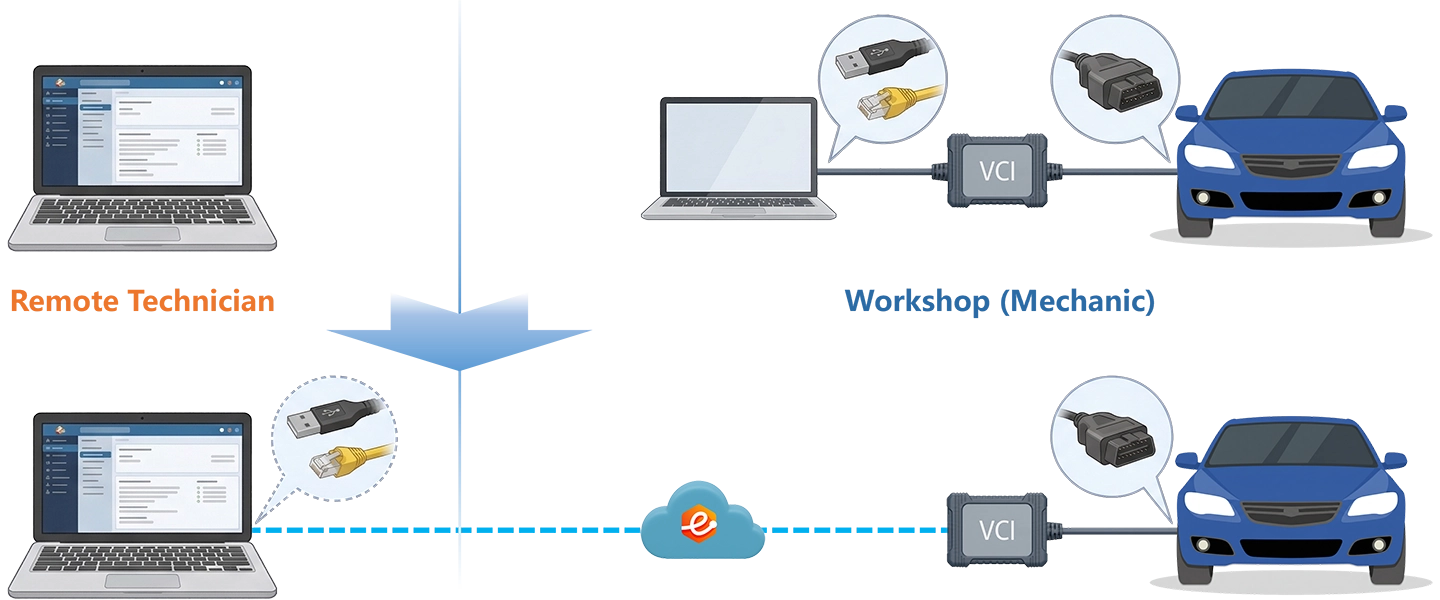
Two Mapping Paths
Maps the branch’s USB VCI directly to your central expert’s PC as a local USB device. GDS2, FDRS, wiTECH 2.0, TechStream, i-HDS, and standard J2534 USB interfaces use this path. The OEM software discovers the VCI the same way it would on a local bench. Supports Relay and Direct (P2P) modes — P2P for USB devices only, where RTT is consistently below 80ms on both sides.
Maps the branch’s DoIP or RNDIS network adapter to your expert’s PC as a local network interface. Required for VCIs that communicate with the vehicle over Ethernet — Mercedes SD Connect, BMW ICOM, VAS 6154A, and other DoIP or RNDIS-capable interfaces. Three bridging modes are available:
- eLinehub Link — Default and recommended for most DoIP workflows. Start here for any new DoIP setup — Mercedes XENTRY (SD Connect C4/C5/C6), BMW ISTA (ICOM Next / ICOM A2 / ENET) and the majority of DoIP VCIs work through this mode without additional configuration.
- eLinehub vNet — Use only when OEM software requires binding to a specific named local adapter rather than discovering automatically.
- Physical Adapter — Use when OEM software requires a physical NIC and cannot accept a virtual interface. Supports setups where OEM diagnostic software runs on a separate PC from the Technician software.
What the Branch or Depot Needs
eLinehub does not provide, supply, or substitute for:
- OEM software licenses (XENTRY, ISTA, ODIS, GDS2, FDRS, TechStream, etc.)
- OEM online account access (Mercedes Online / FDOK, BMW Online, Ford PTS, GM TIS2Web, VW Online, etc.)
- Brand-specific VCI hardware at the branch or depot
- Diagnostic trouble code interpretation or repair guidance
eLinehub is the connection layer between your central expert’s PC and the branch VCI. Your team brings the software, the accounts, and the expertise.
Approach Comparison
Every Brand Your Chain or Fleet Runs
eLinehub supports the VCI types and OEM software combinations used across the brands in your chain or fleet. The branch VCI does not change — only the OEM software and credentials on your central expert’s PC change by brand.
1 eLinehub Link is the recommended starting point for Mercedes-Benz XENTRY and VW Group ODIS. Use eLinehub vNet only when the diagnostic software requires binding to a specific named local adapter rather than automatic device discovery.
For Repair Shop Chains — Consistent Execution Across Every Branch
Repair chains invest in branch technician training, tooling and process standardization. The gap that remains — the one that drives extended cycle times, customer complaints and dealer referrals — is the jobs that branches can start but cannot finish: post-collision repairs with SCN coding requirements, powertrain replacements that need variant coding and adaptation resets, ADAS recalibration after windshield or sensor work.
eLinehub enables a clean operating model: branches handle physical work, the central team handles specialist software execution. Each role does what it is equipped for, without either side compromising the other’s domain.
Typical branch scenarios handled by the central team:
- ECM / TCM / BCM / EIS / KOMBI replacements requiring XENTRY SCN coding
- Gearbox control unit swaps requiring ISN coding and ISTA-P SWE write
- VW / Audi MQB / MLB component replacements requiring SFD unlock via ODIS-Engineering
- GM module replacements requiring SPS2 calibration via TIS2Web
- MBUX head unit or digital instrument cluster installation requiring online pairing via Mercedes Online
- LED headlamp retrofit on VW platforms requiring ODIS component activation
- BMW parking assistant, heated steering wheel or ambient lighting options via E-Sys
- Front camera calibration after windshield replacement
- Radar sensor alignment and initialization via OEM diagnostic routines
- 360° surround-view system reinitialization after bumper replacement
- Steering angle sensor reset and ESP calibration after suspension work
For ADAS calibration: the physical setup and target positioning remain the branch technician’s responsibility. The central expert executes the OEM software sequence once the branch confirms physical readiness.
Chain Scenarios
Mercedes-Benz C-Class TCM — Branch Stall on SCN Coding
Multi-location European brand chain, 8 branches, central specialist team of 4 · Repair chain running XENTRY under a shared Mercedes Online FDOK account
Note: The entire remote execution takes 18 minutes from session acceptance to confirmation. The SD Connect never left Branch 4. Your FDOK credentials were never entered on the branch PC. The branch technician cleared the lift and called the customer before the end of the shift.
BMW and VW Group — Two Branches, Two Specialists, Same Afternoon
Multi-brand independent chain, 12 locations, central team of 5 specialists organized by brand group · MSO running both ISTA and ODIS across a mixed-brand service network
Note: Both branches clear their lifts the same afternoon. Neither vehicle was transported. Neither specialist left the office. The two sessions ran concurrently on separate Technician accounts — Branch 7 and Branch 11 see only their own orders. A central team of five specialists running concurrent sessions by brand group is the operating model that makes 12-branch coverage manageable without increasing travel, distributing credentials, or depending on dealer availability.
For Fleet Maintenance Operations — One Expert Team Across All Depots
Fleet operations have one metric that overrides all others: time off road. Every hour a van, truck or specialty vehicle sits waiting for a programming specialist is an hour of lost utilization. Industry data puts light-duty vehicle downtime at $448 to $760 per vehicle per day (Milwaukee Tool One-Key platform data, cited by Platform Science). For heavy-duty trucks, the operating cost is approximately $91.27 per hour — close to $700 per day in lost utilization.
A module replacement that finishes its mechanical work on Tuesday and completes programming on Thursday has accumulated more in fleet downtime cost than the programming session itself.
eLinehub places OEM programming capability at every depot without placing a specialist at any of them. Each depot has a mechanic who can perform the physical work and connect the VCI. The central expert — or a small team covering multiple OEM brands — handles all programming execution remotely.
Typical fleet programming scenarios:
- PCM / ECM replacement after engine rebuild: FDRS (Ford), SPS2 (GM), XENTRY SCN (Mercedes)
- Transmission control unit replacement: ISN / SFD coding (BMW), adaptation reset, SPS2 gearbox calibration (GM)
- Body and chassis module replacements: BCM coding, door module adaptation, lighting control initialization
- Fleet telematics gateway replacement requiring OEM coding for CAN bus registration
- Refrigeration unit ECU requiring variant coding after unit swap
- Lift or hydraulic control module initialization on service and utility vehicles
- Post-repair fault code clearance and system readiness check before returning vehicle to service
- DoIP topology scan to confirm all modules are communicating after multi-ECU work
- Parameter verification after chassis or driveline work
Fleet Scenario
Ford Transit PCM — Fleet Depot, Same-Shift Resolution
Last-mile delivery fleet, 40-vehicle depot, no on-site OEM specialist · Fleet maintenance operation running FDRS under a Ford PTS subscription
Note: The Transit returns to the depot pool the same shift. At $448 to $760 per vehicle per day in fleet downtime cost, a same-shift resolution compared to a next-day dealer appointment recovers a full day’s utilization per vehicle. For a depot processing five module replacements per month, the scheduling difference — same shift vs. next day — compounds across the maintenance calendar. The depot mechanic’s role throughout: connect the VCI, create the order, confirm the vehicle is ready. No PTS account. No FDRS installation.
How the Central Team Operates eLinehub
What the branch or depot does
- Connect the VCI to the vehicle OBD port and to the site PC via USB or wired Ethernet — wired is required for programming sessions.
- Install eLinehub Mechanic on the site Windows PC — one-time setup, free, no OEM software required.
- Create an order with vehicle details and symptom notes. Share the Passcode with the central team, or use auto-assignment if your Custom Mechanic build is deployed to that site.
What the central expert does
- Accept the incoming order in eLinehub Technician — via Passcode entry or auto-assignment queue.
- Select the shared VCI and establish the connection. For DoIP-based VCIs, select eLinehub Link first — it covers Mercedes XENTRY, BMW ISTA, and most DoIP workflows. Switch to eLinehub vNet only if the software requires binding to a specific local adapter.
- Check the connection status panel: confirm RTT is below 50ms and packet loss is below 0.3% before starting any SCN coding or flash sequence. Wired Ethernet on the expert PC is strongly recommended.
- Launch the relevant OEM software — XENTRY, ISTA, ODIS, SPS2, FDRS — and perform the job as on a local bench.
Admin dispatch and team management
- Order dispatch: Admins assign incoming orders to the right specialist by brand, system type or site.
- Auto-assignment: Orders from sites using your Custom Mechanic build route automatically to the designated expert without manual Passcode exchange.
- Email notification: When a site creates an order, the admin receives a notification and can assign before the expert team opens the queue.
- Role separation: Branch staff create orders; central experts execute; admins control dispatch and team membership. No branch can access another branch’s orders.
Business Control and Customer Protection
Every depot and branch relationship your central team builds — a fleet account that routes its programming work consistently to your specialists, a chain branch that trusts your turnaround time — is a revenue stream built on reliability. The risk of any platform-based service is that the platform becomes the relationship instead of you.
eLinehub’s Customer Protection is built to prevent that at the account level.
Every order submitted by a branch or depot is protected by a Passcode set by your Technician team. Only a Technician holding the correct Passcode can accept that order. Jobs cannot be intercepted, redirected, or picked up by other specialists on the platform. A branch that submits a job to your central team reaches your central team — no one else.
Your team distributes a customized version of the Mechanic client to every branch and depot in the network. All orders route to your Technician account by default, without Passcode exchange. As you expand the network, each new site that installs your custom build enters your dispatch pipeline automatically. The relationship is yours from the first session.
Complex jobs — SFD unlock, multi-ECU sequences, GeKo sessions — can be shared with a trusted external specialist. The collaborator executes the session without seeing the branch’s identity, contact information, or vehicle history. They cannot contact the branch directly. The work is completed; your client relationship is not exposed.
Network Requirements
Stable network conditions are required, not recommended, for remote programming sessions. A dropped connection during a TCM flash or SCN coding sequence means an aborted job, a rescheduled lift, and a delayed vehicle return. eLinehub displays live RTT, packet loss and connection quality in the session status panel — the expert confirms conditions before initiating any flash or coding sequence.
When a DoIP vehicle’s gateway interrupts the expert’s internet connection, use the Switch button in the Technician software to toggle between diagnostic priority mode and normal internet access. Do not execute any diagnostic or programming operation during the switch transition.
Evaluate With a Real Job
The most effective way to evaluate eLinehub for a chain or fleet operation is to run a real session between your central expert and one branch or depot — not a demo scan, but a real coding or adaptation procedure. Evaluate whether VCI behavior, session stability and OEM tool response are sufficient for production use across your network.
- Any Windows PC (Windows 7 or later, 64-bit; Windows 10 / 11 recommended)
- Any compatible VCI connected to a vehicle or bench power supply
- eLinehub Mechanic installed — free download, no account required for basic use
- eLinehub Technician installed — free trial
- Your existing OEM software (XENTRY, ISTA, ODIS, SPS2, FDRS or equivalent) already installed and working
Need more trial credits or a longer evaluation window? Contact support@elinehub.com — describe your use case and the trial will be extended accordingly. No sales process, no commitment required.
Frequently Asked Questions
Get Your Central Team Connected to Every Branch
Your specialists have the credentials. Your branches have the vehicles and VCIs. eLinehub bridges them — no travel, no credential exposure.
Questions about deployment or fleet onboarding: support@elinehub.com
Requires Windows 7 or later (64-bit) on Technician and Mechanic machines. Windows 10 / 11 recommended. Mac, Linux, and Android are not supported. Session-based pricing; free trial available.