
Nissan Remote Diagnostics & ECU Programming:
CONSULT III Plus and VI3 Mapped to Your PC
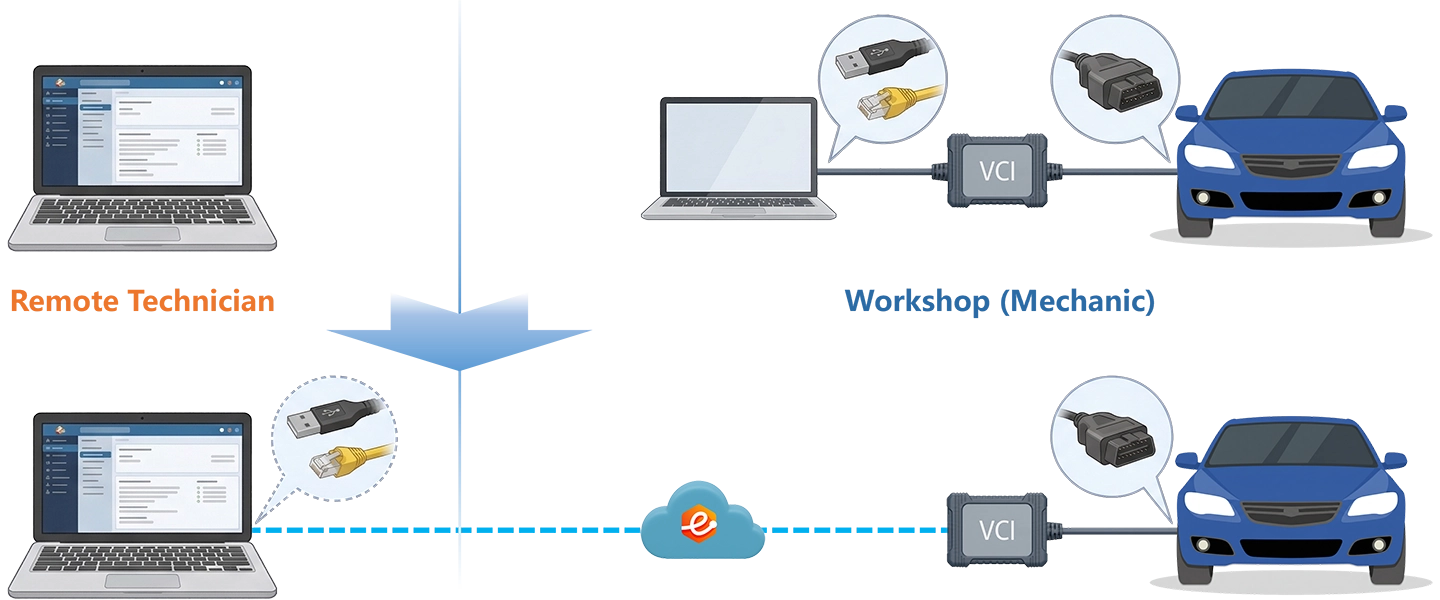
CONSULT III Plus requires the Nissan VI3 or VI2 to appear as a locally enumerated USB device on the diagnostic PC. CONSULT 4 requires the same for cloud-based sessions. NERS requires a valid J2534 PassThru interface. None of these tools can operate through a screen share or generic VPN tunnel. eLinehub maps the workshop VCI at the OS and driver level to your Technician PC — CONSULT III Plus, CONSULT 4, and NERS each discover it as a native local device.
- ✓Nissan VI3, VI2, and J2534 PassThru devices appear on your Technician PC as locally connected USB devices — CONSULT III Plus, CONSULT 4, and NERS discover them through the standard driver path
- ✓Blank ECM/TCM flash, ADAS calibration, SGW unlock, and immobilizer programming all run from your PC with your own Nissan TechInfo subscription and LSID license
- ✓The workshop installs only eLinehub Mechanic (free) — no CONSULT subscription, no TechInfo account, no LSID license at the workshop
The workshop connects the VI3 and the vehicle. You bring CONSULT and your TechInfo credentials. eLinehub provides the bridge. · By eLinehub ·
You hold a CONSULT III Plus or CONSULT 4 subscription, a Nissan TechInfo account, and an LSID license, and want to perform radar programming, blank ECM/TCM flash, BSM calibration, and immobilizer work for workshops that have a VI3 or VI2 but no OEM subscription.
You service 2020+ SGW-protected Nissan and Infiniti vehicles and need OEM-level diagnostics, ERAC scanning, or ADAS calibration that your aftermarket scan tools cannot complete without AutoAuth or OEM software access.
You provide on-demand ECU programming, ADAS calibration, and post-repair scanning services across multiple shops and collision centers, and need a single platform that covers all Nissan and Infiniti architectures from NERS-era vehicles through CONSULT 4 models.
Why Nissan OEM Software is Required
CONSULT III Plus (C3P) — The Workhorse
2002MY–CurrentAll Nissan and Infiniti models not assigned to C4 · Rogue · Altima · Sentra · Pathfinder · Murano · LEAF · all Infiniti
Unlike aftermarket scan tools that communicate through generic OBD protocol libraries, C3P requires the Nissan VI3 or VI2 to appear as a locally enumerated USB device on the diagnostic PC — a requirement that is invisible during bench work but becomes the central obstacle in any remote approach. C3P handles ECM and TCM reprogramming, blank module flash, ADAS sensor configuration, immobilizer programming with LSID, and full system scanning. Screen sharing and generic VPN tunnels cannot satisfy USB device enumeration; the VCI must appear at the driver and OS level as a native local device.
CONSULT 4 (C4) — Cloud Platform, Same USB Constraint
2023MY+2023+ ARIYA (FE0) · 2024+ Rogue (T33) · 2025+ Kicks · Murano · Armada · 2025+ Infiniti QX80
Unlike C3P which is locally installed, C4 is a web-based platform that still requires the Nissan VI3 to appear as a locally attached USB device on the diagnostic PC — the same constraint as C3P, on top of an active internet connection to Nissan’s cloud. C4 requires the VI3 interface (VI2 is incompatible) and a Nissan-spec Toughbook (CF-54 or FZ-55 purchased through TechMate) or a qualifying PC meeting Nissan’s hardware specifications. Any remote approach that cannot satisfy USB device enumeration on the Technician’s machine cannot run C4.
NERS — J2534 Legacy Reprogramming
1999–2019MYAll Nissan and Infiniti vehicles 1999–2019MY requiring ECM/TCM reprogramming or blank module programming outside C3P
Unlike CONSULT III Plus which requires a proprietary Nissan VI, NERS (Nissan ECU Reprogramming Software) performs ECM and TCM reprogramming, blank module programming, and VIN writing through any Nissan-validated J2534 PassThru device. NERS covers the large installed base of pre-2020 Nissan and Infiniti vehicles and remains essential for shops handling older models that need firmware updates or blank ECM/TCM replacement programming. The J2534 PassThru device must still appear as a valid interface on the diagnostic PC.
Security Gateway (SGW) — The Aftermarket Barrier
2020+ Sentra · 2021+ Rogue · 2022+ Pathfinder2020+ Sentra (B18) · 2021+ Rogue (T33) · 2022+ Pathfinder (R53) · ARIYA · 2024+ Armada · 2024+ Kicks
Unlike passive CAN-bus filtering on some brands, Nissan’s Secure Gateway Module actively blocks aftermarket scan tools from performing bi-directional functions, active tests, calibrations, and module programming unless the tool is authenticated through AutoAuth. For independent workshops using non-OEM scanners, this means radar programming, BSM calibration, airbag module configuration, and ECM replacement on SGW-protected vehicles require either an AutoAuth-linked tool or OEM CONSULT software — driving demand for remote access to Technicians who hold active OEM subscriptions.
Programming Interruption Risk — Blank Flash Has No Recovery Path
All models under ECM/TCM flashApplies to all blank ECM/TCM programming via C3P or NERS · Rogue · Altima · Pathfinder · Frontier · all Infiniti
Unlike a routine diagnostic session that can be retried if interrupted, a blank ECM or TCM flash operates on a module with no existing software — there is no fallback state. A dropped USB connection mid-flash leaves the module unrecoverable without bench programming or dealer intervention. Nissan programming procedures require stable battery voltage within the specified range, all electrical loads off, Bluetooth devices disabled near the VCI and PC, and a wired internet connection on both sides. Any remote approach that introduces latency spikes, packet loss, or USB instability is a direct liability during blank module programming.
How eLinehub Maps Nissan VI3 to Your CONSULT Session
eLinehub does not relay your screen or proxy VCI commands. It maps the physical Nissan VI3, VI2, or J2534 PassThru device at the workshop directly into the Technician’s PC at the OS and driver level. CONSULT III Plus discovers it as a native local USB device. CONSULT 4 sees a locally attached VI3. NERS finds a valid J2534 PassThru interface. No modification to the diagnostic software. No workarounds.
Screen Share vs Hardware Relay Box vs eLinehub
Three Nissan Remote Programming Scenarios
Each scenario starts from the point where the mechanical work is done and the Nissan VI3 is connected via USB to the workshop PC. The Mechanic does not need CONSULT III Plus, CONSULT 4, NERS, or any Nissan software subscription.
Front Radar Replacement — 2022 Nissan Rogue T33 (SGW Unlock + Module Config)
Collision center. New front radar sensor (ACC / Intelligent Forward Collision Warning) installed. Vehicle is a 2022 Rogue T33 — SGW-protected. Shop has Nissan VI3 and eLinehub Mechanic; no OEM CONSULT subscription.
- Connect the Nissan VI3 to the workshop PC via USB. Connect the OBD-II cable from the VI3 to the Rogue’s diagnostic port.
- Open eLinehub Mechanic. Enter vehicle details: Nissan, Rogue, 2022, front radar programming. Create the order. Share the order Passcode with the remote Technician. Confirm the workshop PC is on a wired internet connection.
- Remain on-site during the session to monitor battery voltage and confirm all electrical loads are off.
- Accept the incoming order in eLinehub Technician. Under the Mechanic USB device list, select the Nissan VI3. Choose Relay — recommended for SGW sessions where stability matters more than minimum latency.
- Initiate the connection. Once the USB mapping completes, launch CONSULT III Plus. C3P discovers the VI3 as a locally connected USB device.
- Within C3P, authenticate through Nissan TechInfo and unlock the Security Gateway using your credentials. The SGW must remain unlocked throughout the remainder of the session.
- Navigate to the replacement radar module. Execute module configuration, load the VIN-specific calibration file, and complete the radar aiming sequence. C3P confirms completion. Close the SGW session on exit.
Blank TCM Programming — 2019 Nissan Altima L34 (CONSULT III Plus)
Independent transmission shop. CVT replacement required. Replacement TCM shipped from Nissan parts as a blank module — no software installed. Shop has Nissan VI3 and eLinehub Mechanic.
- Install the replacement blank TCM in the Altima. Connect a battery maintainer to hold voltage within the specified range throughout the flash. Connect the Nissan VI3 via USB to the workshop PC, then OBD-II to the vehicle.
- Open eLinehub Mechanic. Create the order: Nissan, Altima, 2019, blank TCM programming. Confirm wired internet on the workshop PC. Share the Passcode with the Technician.
- Disable all electrical loads and Bluetooth devices near the VI3 and PC. Remain available throughout the flash; do not allow the ignition to cycle or the battery maintainer to disconnect.
- Accept the order in eLinehub Technician. Under the Mechanic USB device list, select the Nissan VI3. Choose Direct (P2P) — lowest latency for blank flash sessions; available for USB devices only. Confirm in the network monitor panel that RTT is under 80 ms and packet loss is 0%, with wired connections on both sides, before proceeding.
- Initiate the connection. Once the USB mapping completes, launch CONSULT III Plus. C3P discovers the VI3. Navigate to blank module programming for the TCM.
- Using your Nissan TechInfo account, download the VIN-specific TCM calibration file. Confirm calibration number matches the vehicle’s production data. Begin the flash only after confirming connection stability.
- C3P executes the blank flash in a single uninterrupted session. On completion, confirm module software version, clear DTCs, and run a post-programming functional check through C3P.
ERAC Post-Repair System Scan — 2023 Nissan Pathfinder R53 (Full System, SGW)
Collision repair facility. Post-repair inspection required after front-end structural work. Vehicle is a 2023 Pathfinder R53, SGW-protected. Shop has Nissan VI3 and eLinehub Mechanic; no OEM CONSULT subscription.
- Connect the Nissan VI3 to the workshop PC via USB. Connect OBD-II to the Pathfinder. Open eLinehub Mechanic. Create the order: Nissan, Pathfinder, 2023, ERAC post-repair scan. Share the Passcode with the remote Technician.
- Confirm that all repair work is complete and the vehicle is in a static, safe state before the scan session begins.
- Accept the order in eLinehub Technician. Under the Mechanic USB device list, select the Nissan VI3. Choose Relay for maximum session stability. Initiate the connection and wait for the USB mapping to complete before launching CONSULT III Plus.
- Authenticate through Nissan TechInfo and unlock the Security Gateway. Run an all-system scan across all Pathfinder modules. Document DTCs, live data anomalies, and module software versions for the collision repair record.
- For modules affected by the repair (radar, BSM, airbag, steering), confirm calibration status. If ADAS re-calibration is required, book a separate calibration session and issue the calibration procedure report to the shop.
- Export the full scan report from C3P. Close the SGW session. Confirm all post-repair DTCs are addressed or documented before vehicle delivery.
Ready to try on a live Nissan or Infiniti?
Free trial starts automatically — no credit card required.
Download Technician Software — Free TrialBuilt Around Nissan’s Programming Risk Profile
Nissan ECU programming carries explicit manufacturer warnings about connection stability. A lost connection during blank ECM or TCM flash can permanently damage the module. eLinehub is built around this risk profile at the transport layer.
Blank Module Flash Integrity
CONSULT III Plus blank ECM and TCM programming transfers firmware to a module that has no existing software — there is no fallback if the transfer fails mid-session. eLinehub’s lossless transport layer maintains USB communication at a level equivalent to a direct cable connection at the workbench, preserving the transfer integrity these operations require. A failed flash due to transport instability is treated with the same seriousness as a lost local USB connection.
Reprogramming Session Continuity
Nissan programming procedures require sustained, uninterrupted communication between the VCI and the diagnostic PC throughout the entire multi-step reprogramming sequence. eLinehub carries this traffic without reshaping, compression, or throttling — preserving the timing patterns CONSULT III Plus and NERS expect during ECM flash, calibration file transfer, and post-flash verification. Session continuity is maintained across all phases of the reprogramming workflow.
Security Gateway Session Stability
On 2020+ SGW-protected vehicles, the gateway must remain unlocked throughout the entire programming or calibration session. A connection interruption can cause the SGW to re-lock, requiring the Technician to re-authenticate before any further programming function becomes available. eLinehub maintains session stability across the full SGW unlock, module configuration, and ADAS calibration workflow — preventing mid-session re-lock events during routine Relay or P2P sessions.
Connection Mode: P2P vs Relay
Relay routes traffic through the nearest eLinehub relay node for maximum stability. Use Relay for diagnostics, fault reading, live data, ERAC scanning, ADAS calibration, and any session where stability matters more than minimum latency. Direct (P2P) establishes a peer-to-peer path for minimum latency and is available for USB devices only. Use Direct (P2P) for blank ECM/TCM flash sessions where RTT is under 80 ms, packet loss is 0%, and both sides are on wired connections. eLinehub Technician displays RTT and packet loss in real time — confirm both before switching to Direct.
Step-by-Step Nissan Remote Session
Two installations, one session. The Mechanic needs only eLinehub Mechanic — no Nissan software subscription. The Technician runs CONSULT III Plus, CONSULT 4, or NERS on their own machine under their own credentials.
- Connect the Nissan VI3, VI2, or compatible J2534 device to the workshop PC via USB. Connect the OBD-II cable from the VCI to the vehicle diagnostic port.
- Install eLinehub Mechanic on the workshop PC. No CONSULT III Plus subscription, no TechInfo account, and no LSID license required at this step.
- Open eLinehub Mechanic. Enter vehicle details (brand, model, year, service needed) and create an order. Share the order Passcode with the Technician. For programming sessions, ensure the workshop PC is on a wired internet connection.
- Open eLinehub Technician on your PC — the machine where CONSULT III Plus, CONSULT 4, or NERS is installed, with the correct Nissan VCI driver.
- Accept the incoming order. In the device list, the Nissan VCI at the workshop appears as a USB device ready for mapping.
- Select the VCI from the Mechanic USB device list. Choose the connection mode: Direct (P2P) for blank ECM/TCM flash sessions (USB devices only — wired, RTT < 80 ms, packet loss 0%); Relay for diagnostics, scanning, and ADAS calibration. Confirm network stats in the eLinehub Technician panel before programming.
- Once the connection is established and the USB mapping completes, launch CONSULT III Plus, CONSULT 4, or NERS. The software discovers the VCI as a locally connected USB device. Proceed with diagnostics, module programming, ADAS calibration, or any other function exactly as you would at the vehicle.
The Mechanic does not need CONSULT III Plus, CONSULT 4, NERS, or any Nissan TechInfo subscription. All OEM tools, TechInfo accounts, LSID tokens, and Tweddle ADAS credentials remain on the Technician’s PC.
Software × VCI × Vehicle Coverage
eLinehub supports the complete Nissan and Infiniti diagnostic software stack and every model currently serviceable via CONSULT III Plus, CONSULT 4, or NERS.
Software × VCI × Coverage
Compatible VCIs
Third-party J2534 devices not on Nissan’s official validation list may work with NERS but are not verified against the communication timing requirements of CONSULT III Plus blank module programming. Always confirm VCI compatibility on the Nissan TechInfo validated device list before starting a flash session.
What Nissan Specialists Gain
Serve Any Nissan Workshop — From Anywhere
A Technician running CONSULT III Plus or CONSULT 4 remotely handles the same front radar programming, blank ECM flash, BSM calibration, AVM aiming, and immobilizer work they would perform on-site. No travel time. No overnight stays for multi-module programming jobs on high-volume Nissan models.
Bridge the Security Gateway Gap
Independent workshops and collision centers working on 2020+ Sentra, 2021+ Rogue, and 2022+ Pathfinder hit a hard wall: the SGW blocks their aftermarket tools from performing module programming and ADAS calibration. You bring your OEM CONSULT access and AutoAuth authentication to their vehicle — without requiring them to invest in OEM tools or subscriptions.
Your OEM Credentials Stay Private
CONSULT III Plus accounts, Nissan TechInfo subscriptions, LSID tokens, and Tweddle ADAS credentials are yours. The workshop never accesses your software, your credentials, or your license files. Everything runs on your Technician PC, under your control, with no session visibility on the Mechanic side.
Cover All Nissan Generations
From a 2003 Frontier TCM reprogram via NERS to a 2019 Altima blank ECM flash via C3P to a 2025 ARIYA module scan via CONSULT 4 — the same eLinehub workflow covers every generation. One platform, one subscription model, all three Nissan diagnostic software platforms.
Expand Into Collision Repair & ADAS
Collision centers performing ERAC pre-scan and post-scan work, windshield replacement shops needing camera calibration, and body shops replacing radar and BSM sensors on SGW-protected vehicles are all potential customers. You serve them remotely on a per-vehicle basis, without capital investment on either side.
Back-to-Back Sessions Across Multiple Shops
Sessions are sequential — one active VCI connection per Technician account at a time. Between sessions, you remain available to the next workshop in your queue. Each workshop installs only eLinehub Mechanic and provides a VI3 or VI2; your CONSULT subscription and TechInfo account cover all of them.
Customer Protection
Passcode Order Protection
Default EnabledEvery order is protected by a Passcode only you hold. No other Technician on the platform can accept a job from your workshop contacts. Your customer relationships are private to your account from the first session.
White Label Mechanic App
Strongest BindingDistribute a custom-branded version of eLinehub Mechanic to the collision centers and independent shops you serve. Every order created through your branded app routes to you automatically and permanently — no reassignment, no platform-level competition for your customer base.
Team & External Collaboration
AdvancedFor complex multi-specialist Nissan jobs — immobilizer work requiring a security specialist, or a CONSULT 4 session requiring a Technician with VI3 access — you can bring in a collaborator without exposing your customer. The external specialist accesses only the vehicle session, not the workshop’s identity or contact details.
Frequently Asked Questions — Nissan Remote Diagnostics & Programming
Start Your First Nissan Remote Session
Your TechInfo subscription, LSID token, and OEM software stay exactly where they are. Free trial starts automatically.
Questions or setup support: support@elinehub.com