
Ford and Lincoln Remote Programming:
VCM3 Mapped to Your Technician PC via eLinehub
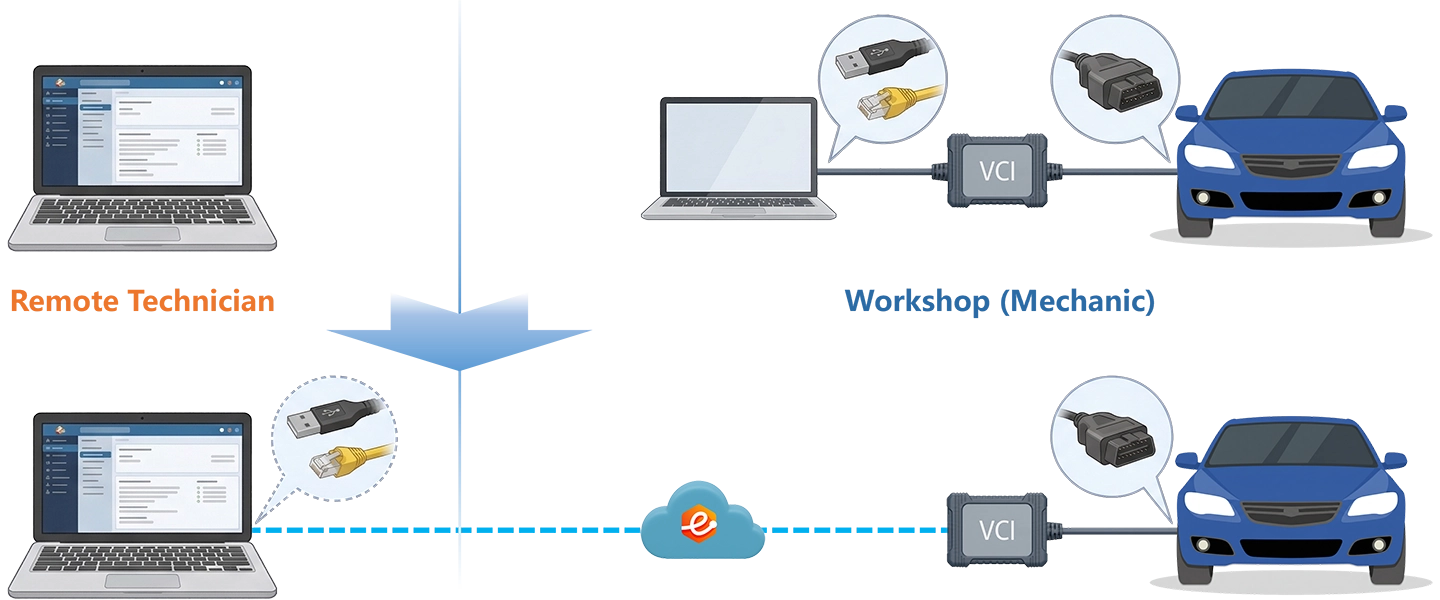
IDS and FDRS each require the VCM3 to present as a locally connected USB device on the diagnostic PC before the software will discover it. That requirement is invisible when sitting next to the vehicle, but it makes every remote approach that does not operate at the USB device layer impossible. eLinehub maps the VCM3 at the workshop to your Technician PC at the driver and OS level — IDS, FDRS, and FJDS find it through the standard VCI Manager driver path exactly as they would for a physically connected device.
- ✓VCM3 mapped at the driver level via USB — IDS, FDRS, and FJDS discover it as a local J2534 device through the standard VCI Manager driver path
- ✓PCM flash, BCM 3-step initialization, PATS key programming, and ADAS radar PMI all run from your PC with your own Ford dealer credentials
- ✓The workshop installs only eLinehub Mechanic (free) — no IDS subscription, no FDRS dealer login, no NASTF PATS credentials at the workshop
The workshop connects the VCM3 and the vehicle. You bring IDS, FDRS, and your Ford dealer credentials. eLinehub provides the bridge. · By eLinehub ·
Why Ford Module Programming Requires IDS or FDRS with a Local VCI
Ford’s Integrated Diagnostic Software (IDS) and Ford Diagnostic and Repair System (FDRS) both require the VCI — VCM3, VCM II, or compatible J2534 device — to present as a locally connected USB interface on the diagnostic PC. Without that local USB presence, neither application can discover the device or execute any programming operation.
The six job types below represent the core Ford and Lincoln remote programming scenarios where a live VCI connection through IDS or FDRS is the only path to completion.
IDS — USB-Dependent Legacy Platform
1996–current Ford · Lincoln · Mercury (all platforms)
Ford’s Integrated Diagnostic Software handles PCM and TCM reprogramming, Programmable Module Installation, PATS key and immobilizer configuration, and full system scanning across every Ford vehicle from 1996 forward. IDS requires the VCI — whether a VCM3, VCM II, or compatible J2534 device — to appear as a locally connected USB interface on the diagnostic PC. That requirement is invisible when sitting next to the vehicle, but it becomes the core obstacle for any remote approach that does not operate at the USB device layer.
FDRS — Cloud-Connected, VCI-Dependent
2018MY+ F-150 Gen14 · Mustang Mach-E · Bronco · Maverick · Transit Gen4
Ford Diagnostic and Repair System is a cloud-connected application: every session pulls calibration files, as-built data, and programming routines directly from Ford’s servers. This means an active Ford subscription, a live internet connection on the Technician’s PC, and the VCM3 presenting as a local USB device on the same machine. FDRS cannot discover a VCI that is not locally attached — a hard requirement that makes any remote approach depend on solving the USB device layer problem first.
PMI and Multi-Step Module Initialization
BCM, TCM, PCM, radar modules on 2018–current F-150 and Explorer
Ford’s Programmable Module Installation procedure has added steps with each generation. Replacing a BCM on a 2021+ F-150 requires three distinct FDRS operations in a specific sequence: PMI, BCM Initialization/Reset, and PATS Parameter Reset. Skipping or reordering any step leaves the BCM unpaired from the gateway, producing failed turn signals, inoperative door locks, and a vehicle that will not start. Each step depends on the previous completing successfully within a single connected FDRS session.
PATS — Anti-Theft Layer Across All Generations
1996–current Ford · Lincoln (all PATS I–IV and PATS Parameter Reset)
Ford’s Passive Anti-Theft System covers the entire model lineup from 1996 forward. Nearly every module replacement touching the powertrain or body network triggers a PATS procedure. PCM replacement requires Module Initialization via NASTF-authenticated PATS access. BCM replacement on 2021+ vehicles requires PATS Parameter Reset as the third step of the initialization chain. Without an active Ford dealer login and the correct NASTF PATS credentials, independent shops cannot complete these procedures — creating consistent and predictable demand for remote specialists who hold that access.
Programming Interruption Risk
PCM · TCM · BCM on any Ford or Lincoln platform with PATS or FDRS
Ford service information carries explicit warnings: a lost VCI connection during PCM or TCM reprogramming can leave the module in an unprogrammable state requiring bench intervention or dealer support. Voltage must remain stable between 11.0V and 14.5V throughout the flash. Any remote solution that introduces connection instability, latency spikes, or packet loss during an active programming session represents a direct liability. A failed PCM flash on an F-150 means a non-starting vehicle and potential module replacement — a cost the workshop will hold against the Technician responsible.
ADAS Pre-Programming — OEM Init Before Physical Calibration
Front radar · BSM · IPMA front camera on F-150, Explorer, Escape, Ranger, Fusion
Collision centers replacing front-facing radar sensors, blind-spot monitoring modules, or surround-view cameras frequently find that their aftermarket calibration equipment cannot proceed until the new module is initialized through IDS or FDRS. Shops with ADAS calibration equipment are ready for the physical alignment but need OEM software initialization first. This two-step workflow — OEM programming by a remote specialist, physical calibration by the shop — is the standard independent collision center model for Ford ADAS work.
How eLinehub Maps Ford VCM3 to Your IDS and FDRS Session
Unlike screen sharing, which runs IDS or FDRS on the workshop PC, eLinehub maps the VCM3 hardware itself at the driver and OS level on the Technician’s PC. The Mechanic connects VCM3 via USB; eLinehub carries the complete USB device connection across the internet, and IDS, FDRS, and FJDS on the Technician’s machine recognize the remote VCM3 through the standard VCI Manager driver path — the same discovery behavior as a locally connected device.
Driver-Level USB Mapping — No IDS or FDRS Configuration
Unlike screen sharing, which runs IDS or FDRS on the workshop PC, eLinehub maps VCM3 at the driver and OS level so IDS and FDRS recognize it through the standard VCI Manager driver path — the same discovery behavior as a locally connected device. No FDRS settings changes, no VCI configuration changes, and no additional software at either end.
FDRS Cloud Connection Is Independent
Unlike screen sharing, which routes both the VCI traffic and Ford’s cloud session through the workshop’s internet connection, eLinehub separates them: VCM3 is mapped to the Technician’s PC, and the FDRS cloud session runs from the Technician’s own internet. Both connections run in parallel — neither interferes with the other.
P2P Mode Available for Flash Sessions
Unlike Relay mode, which routes traffic through an intermediate server for maximum stability, P2P (Direct) mode establishes a direct path between Mechanic and Technician PCs at the lowest possible latency. Select P2P for PCM and TCM flash sessions when both endpoints are on wired connections and RTT is under 80 ms. For BCM initialization, PATS procedures, and radar PMI, Relay mode is the recommended default.
Screen Sharing vs Hardware Relay Box vs eLinehub
Six Remote Ford Services You Can Offer via eLinehub
Each service below represents a repeatable, billable remote job type that independent Technicians are running through eLinehub today.
Front Radar PMI and Initialization After Replacement
Most RequestedF-150 Gen14 · Explorer · Escape · Ranger · Fusion
When a front distance radar (ACC / Pre-Collision Assist) is replaced, the new module requires PMI in IDS or FDRS to load its configuration and initialize it before ADAS calibration can begin. Shops with aftermarket calibration equipment call on remote Technicians to complete the OEM initialization step; the shop then performs physical alignment with their own equipment. This two-step model is the most common Ford remote job in collision repair.
BCM Replacement — 3-Step FDRS Initialization Chain
Most Complex2021+ F-150 Gen14 · F-Series platforms with 3-step BCM sequence
BCM replacement on 2021+ F-150 requires PMI, BCM Initialization/Reset, and PATS Parameter Reset — in sequence within a single FDRS session. Shops that run PMI alone are left with no turn signals, no door lock response, and a delayed or failed start. Remote Technicians with FDRS access and F-150 generation experience handle the complete three-step chain reliably.
PCM Replacement and PATS Module Initialization
All Ford · Lincoln with PATS (1996–current)
PCM replacement on any Ford or Lincoln with PATS requires PMI followed by PATS Module Initialization via NASTF-authenticated credentials. Without NASTF PATS access, the vehicle will not start after PCM swap. Remote Technicians complete the entire sequence without the shop needing to invest in dealer credentials they cannot otherwise justify for occasional use.
EPAS Steering Rack Configuration
F-150 · Fusion · Escape · Explorer (EPAS and SCCM replacement)
EPAS rack or SCCM (Steering Column Control Module) replacement requires FDRS configuration to synchronize the new unit with the vehicle network. Without this step, the vehicle shows power steering fault codes, reduced assist, or disabled park assist after rack replacement. Collision-related EPAS replacements on high-volume F-Series and crossover models are a growing remote service category.
PATS Key Programming and Immobilizer Recovery
F-Series · Lincoln Navigator · Explorer · Fleet vehicles
PATS key programming — adding new keys, recoding after theft or water damage, syncing immobilizer after BCM or PCM replacement — requires dealer-level FDRS or IDS access with NASTF PATS authentication. Shops handling fleet reconditioning or collision-related electrical repairs routinely encounter PATS lock situations their aftermarket tools cannot resolve.
TCM Programming — PowerShift DPS6 and Others
Focus DPS6 · Fiesta DPS6 · F-Series 10R80 (IDS and FDRS)
TCM replacement on a DPS6-equipped Focus or Fiesta requires IDS programming and an adaptation reset to allow the transmission to relearn clutch engagement parameters. A failed or incomplete TCM flash leaves the vehicle stuck in Park, with fault codes across multiple modules. Remote Technicians with IDS access and DPS6-specific experience handle these jobs reliably.
Real Job Workflows — Ford Remote Programming Scenarios
Four complete scenarios covering the most common Ford and Lincoln remote diagnostic and programming jobs.
Front Radar PMI and Initialization — 2019+ F-150 / Explorer After Replacement
Primary audience: Remote ADAS programming specialist; collision repair center replacing a front ACC radar and needing OEM initialization before physical calibration.
- Connect VCM3 to the workshop PC via USB, then connect the OBD-II cable from the VCM3 to the vehicle diagnostic port. Confirm VCM3 is recognized by VCI Manager on the workshop PC.
- Install eLinehub Mechanic on the workshop PC. Confirm VCM3 appears as a shareable device. Enter vehicle details (F-150 or Explorer, model year, radar module replacement), create the order, and share the Passcode with the Technician. The vehicle should be at ignition-on with all doors closed.
- Accept the order. In eLinehub Technician, select Mechanic USB. Check the RTT and packet loss readout — for radar PMI on an F-150 or Explorer, confirm RTT is under 100 ms and packet loss is at 0%. Relay mode is recommended for this procedure: it involves sequential FDRS-to-module command exchanges rather than a sustained data stream.
- Wait for VCM3 to initialize on your PC — confirm the device appears in Windows Device Manager under the VCI Manager driver before opening FDRS.
- Launch FDRS. FDRS connects to Ford’s server to pull as-built data for the VIN. Navigate to the front radar module. Active DTCs from the replacement are expected at this stage — confirm the new radar is communicating but not yet initialized.
- Run PMI (Programmable Module Installation). FDRS loads the radar module’s as-built configuration from Ford’s server, programs the module, and confirms initialization is complete. If the vehicle has a surround-view or blind-spot monitoring module that also requires initialization, proceed within the same session.
- Clear all DTCs and confirm the radar is initialized with no active faults before ending the session. Notify the workshop they can now proceed with physical ADAS alignment using their calibration equipment.
Note: A single ADAS programming specialist can serve multiple collision centers this way — each provides a VCM3 and the vehicle; the specialist provides the FDRS subscription and Ford dealer credentials.
BCM Replacement — 3-Step FDRS Initialization on 2021+ F-150
Primary audience: Remote programming specialist; independent body or collision shop replacing a BCM on a Gen14 F-150 and encountering the multi-step FDRS initialization chain.
- Confirm the replacement BCM is installed and all body network connectors are seated. Connect VCM3 to the workshop PC via USB and to the vehicle OBD-II port. Connect a battery charger maintaining voltage at 13.5V or above — all three FDRS initialization steps require stable voltage throughout.
- Install eLinehub Mechanic. Confirm VCM3 is shareable, create the order for BCM 3-step initialization on the F-150, and share the Passcode. Notify the Technician that the vehicle is at a steady ignition-on state and ready for the first FDRS step.
- Accept the order. In eLinehub Technician, select Mechanic USB. For this procedure Relay mode is recommended — session stability across all three FDRS steps matters more than minimum latency. Confirm RTT is under 100 ms and packet loss is at 0% before proceeding.
- Wait for VCM3 initialization on your PC, then launch FDRS. The BCM will show as newly installed with active DTCs — this is expected. Pull the as-built configuration for the VIN.
- Step 1 — PMI: Navigate to the BCM and run Programmable Module Installation. FDRS pulls as-built data from Ford’s server and programs the BCM with the correct software version and VIN-specific configuration. Do not disconnect between steps.
- Step 2 — BCM Initialization/Reset: Navigate to Programmable Parameters → BCM Initialization/Reset. This step completes the gateway handshake and integrates the BCM into the body network. Skipping or reordering this step leaves turn signals, door locks, and module communications unresolved.
- Step 3 — PATS Parameter Reset: Navigate to PATS Parameter Reset. This synchronizes the new BCM with the vehicle’s immobilizer chain. After all three steps complete, clear DTCs and verify — turn signals, door locks, normal ignition start sequence, and no active BCM network faults.
Note: Shops that attempt BCM replacement without FDRS access run PMI alone and call a specialist when the vehicle shows no turn signals and will not start normally. The three-step sequence requires an active FDRS dealer login to execute.
PCM Replacement and PATS Module Initialization — Ford / Lincoln
Primary audience: Remote programming specialist; independent shop replacing a PCM and needing NASTF-authenticated PATS initialization to restore start function.
- Confirm the replacement PCM is installed. Connect VCM3 to the workshop PC via USB and to the vehicle OBD-II port. Battery voltage must remain between 11.0V and 14.5V throughout — connect a battery support unit before proceeding. All unnecessary electrical loads should be off.
- Install eLinehub Mechanic. Confirm VCM3 is shareable, create the order for PCM programming and PATS initialization, and share the Passcode. Do not attempt to start the vehicle before the Technician completes PATS initialization.
- Accept the order. In eLinehub Technician, select Mechanic USB. For PCM flash and PATS initialization, select P2P (Direct) mode if both endpoints are on wired connections and RTT is under 80 ms. P2P reduces latency for the firmware transfer phase. Confirm packet loss is at 0% before proceeding.
- Wait for VCM3 initialization on your PC. Launch IDS (for pre-2018MY vehicles) or FDRS (for 2018MY+ vehicles) appropriate for the VIN. Identify the PCM module and note active DTCs from the replacement.
- Run PMI to load the PCM’s as-built configuration and software version from Ford’s server. IDS or FDRS pulls calibration data for the VIN and programs the replacement PCM. Do not end the session between PMI and PATS initialization.
- Navigate to PATS → Module Initialization. This step requires your NASTF-authenticated PATS credentials — your dealer login and NASTF PATS token remain on your PC throughout. PATS Module Initialization synchronizes the new PCM with the vehicle’s immobilizer chain. Without this step, the vehicle will crank but not start.
- Clear DTCs, confirm PATS status shows as Initialized, and verify normal start function. The workshop should confirm the vehicle starts and no active powertrain warning lights remain before closing the session.
Note: Independent shops that perform PCM replacement without NASTF PATS access face an immobilized vehicle that cranks but will not start. A remote Technician with NASTF credentials completes PATS Initialization without the shop needing dealer-level subscriptions.
TCM Programming After DPS6 Replacement — Focus / Fiesta
Primary audience: Remote programming specialist; transmission shop or independent dealer replacing a DPS6 TCM and needing IDS programming and adaptation reset.
- Confirm the replacement TCM is installed and all transmission connectors are seated. Connect VCM3 to the workshop PC via USB and to the vehicle OBD-II port. Confirm the vehicle is in Park with the parking brake applied.
- Install eLinehub Mechanic. Confirm VCM3 is shareable, create the order for TCM programming on a Focus or Fiesta (DPS6 variant, model year), and share the Passcode with the Technician.
- Accept the order. In eLinehub Technician, select Mechanic USB. Check RTT and packet loss — confirm packet loss is at 0% and RTT is under 80 ms. Select P2P mode if both sides are on wired connections for the firmware transfer phase.
- Wait for VCM3 initialization on your PC, then launch IDS. DPS6-equipped Focus and Fiesta are pre-2018 platforms covered by IDS — confirm the VIN and TCM module are visible before proceeding.
- Run PMI on the TCM module. IDS retrieves TCM calibration and programming data from Ford’s server and writes the correct software version to the replacement module.
- After PMI completes, navigate to Programmable Module Installation → Adaptation Reset. DPS6 adaptation values must be reset after TCM replacement to allow the transmission to relearn clutch engagement parameters. Skipping this step produces jerky engagement, fault codes across the TCM and engine controllers, and in some cases Park-lock issues.
- Clear DTCs, confirm normal transmission communication across all modules, and verify no active faults before ending the session. Advise the workshop to perform a drive cycle so DPS6 adaptation can begin.
Note: DPS6 TCM programming is an IDS procedure. VCM3 presents as a USB device on both IDS and FDRS platforms, so the same eLinehub workflow covers the complete Ford range — from a 2009 Fiesta to a 2024 F-150 — without configuration changes.
Ready to run your first remote Ford programming session?
Free trial starts automatically. No credit card required.
Download Technician Software — Free TrialSetup — Mechanic and Technician
Two software installs. No hardware on either side beyond the VCI the workshop already has.
- Connect the Ford VCM3, VCM II, or compatible J2534 device to the workshop PC via USB. Then connect the OBD-II cable from the VCI to the vehicle diagnostic port.
- Download and install eLinehub Mechanic on the workshop PC. No IDS subscription, no FDRS dealer login, no NASTF PATS credentials required.
- Open eLinehub Mechanic. Confirm the Ford VCI appears as a shareable device. Enter vehicle details (brand, model, year, service type), create the order, and share the Passcode with the Technician.
- For PCM or TCM flash sessions: ensure the workshop PC is on a wired internet connection. Connect a battery charger to maintain vehicle voltage between 11.0V and 14.5V throughout the flash.
- Ensure VCI Manager (Rotunda) is installed on your PC with the Ford VCI driver active. This is the driver IDS and FDRS use to discover the VCM3. Install IDS and FDRS if not already present.
- Download and install eLinehub Technician. A wired internet connection is recommended; for flash sessions it is required.
- Open eLinehub Technician. Accept the incoming order. In the device list, select the Ford VCI and choose Mechanic USB.
- For PCM or TCM flash: select P2P (Direct) mode if both sides are wired and RTT is under 80 ms. For BCM initialization, PATS procedures, and radar PMI: use Relay mode. Check RTT and packet loss in the eLinehub Technician interface before proceeding.
- Once the VCI is mapped, wait for VCM3 to initialize on your PC. Then launch IDS or FDRS. The software discovers the VCI as a locally connected device. Log in with your Ford dealer credentials and proceed.
Network Requirements
Both sides need a minimum 10 Mbps upload bandwidth. For PCM and TCM flash sessions, wired connections are required on both sides. Check RTT and packet loss in eLinehub Technician before starting any programming session.
Before any PCM or TCM flash: A lost VCI connection during a firmware transfer can leave the module in an unprogrammable state requiring bench intervention or dealer support. Connect a battery charger maintaining 11.0–14.5 V throughout the entire flash. All unnecessary electrical loads must be off. Do not attempt programming sessions over a mobile hotspot or congested WiFi.
VCI initialization: Wait for VCM3 to fully initialize on the Technician’s PC before launching IDS or FDRS. Opening either application before initialization completes returns a “no interface found” or “VCI not detected” error and requires restarting the session.
Ford and Lincoln Vehicle and Software Compatibility
Software × VCI × Coverage
Customer Protection and Specialist Value
Close the dealer-access gap — full Ford range from one seat
Independent workshops hit a consistent wall on PATS procedures, FDRS-only module initialization, and OEM radar programming on 2018+ vehicles. With eLinehub, you bring your Ford OEM access to their vehicle — from a 2004 F-150 PCM reprogram via IDS to a 2023 Mach-E module scan via FDRS — without the workshop investing in credentials they cannot justify for occasional use.
Build repeatable revenue from collision centers
Ford is the highest-volume brand in US collision repair. Collision centers replacing front radar sensors, BSM modules, cameras, and airbags on F-150s and Explorers need OEM initialization before their calibration equipment can proceed. eLinehub lets you serve them on a per-vehicle basis without capital investment on either side.
Your OEM tools and credentials stay private
FDRS dealer login, NASTF PATS credentials, IDS subscription, and Ford TechInfo access are yours. The workshop never touches your software, your login, or your license. Everything runs on your machine, under your control, session after session.
Built-in Workshop Relationship Protection
eLinehub is built so that the Technician’s workshop relationships stay with the Technician — not with the platform.
Passcode Order Protection
Every order requires a Passcode to accept. No other specialist on the platform can pick up a workshop’s job without it. The Mechanic shares the Passcode directly with the Technician they already work with — the relationship stays private.
Custom Mechanic Software
Distribute a white-label Mechanic build permanently linked to your Technician account. Orders from that workshop are auto-assigned to you by default. No other specialist can claim the workshop through a white-label install.
Secure Order Sharing
For complex multi-ECU jobs — PATS recovery after flooding, BCM plus radar initialization — share a specific order with a trusted colleague. The colleague sees the VCI data for that order only, not the Mechanic’s contact details or any other orders.
Ford VCM3 Remote Programming FAQ
Eight questions covering VCM3 USB mapping, IDS and FDRS discovery, PATS credential handling, FDRS cloud connection, BCM 3-step procedure, P2P vs Relay, connection quality, and J2534 device compatibility.
Start Your First Remote Ford Programming Session
Free trial starts automatically. No credit card required to get started.
Questions or setup support: support@elinehub.com